 Simulacra
Suggestions and help
Mnemo's tips, the "?" explainers, Why? cards, example chips, AI suggestions, Fill the rest and the step palettes that help you choose values in the Forge.
The Forge has hundreds of settings, and most of them have help next to them. You can read what a setting does, see typical values and good picks, borrow one step from a palette, or ask the AI for values that fit the rest of the character.

Mnemo the owl
Mnemo sits at the top of the options panel (and of the start screen) with a plain-language tip for the current step, a welcome on the start screen, a reading pose while a description is being filled in and a cheer on the celebration screen.
- Click the X beside the bubble (Hide Mnemo) to hide the guide.
- Click the ? in the top bar (Show Mnemo's tips) to bring it back.
The choice is remembered between sessions.
“?” explainers
A small ? beside a setting opens a card in three parts: WHAT IT IS, HOW IT CHANGES POSTS and EXAMPLE.
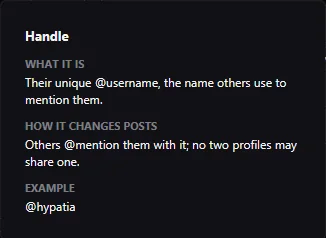
Hover the ? to read it. It is also a tab stop: Enter or Space pins the card open while it keeps focus, and Esc closes every open card.
Why? cards
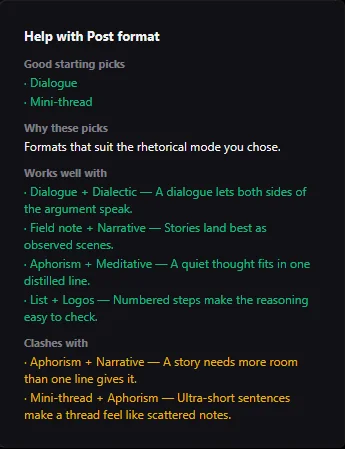
Each setting's caption ends with Why? (a light bulb). Its card, titled Help with …, gathers whichever of these apply:
| Heading | What it says |
|---|---|
| What makes a good value | A one-line tip for the field |
| Why this range / Why these picks | Why the typical range or starting picks fit this character |
| Advice | Guidance for the current draft |
| Examples | Sample values |
| Good starting picks | Options that suit what you have chosen so far |
| Works well with / Clashes with | Combinations that support or fight each other |
Hints next to each control
| Hint | Where | How to use it |
|---|---|---|
| Example chips | Under text fields | Click a chip to use it; Shift-click to add it to what is typed. In a narrow window the chips collapse to one row with More / Less. |
| Suggested badge | On option cards | Marks good starting picks for this character |
| Typical range | Under sliders | Typical a–b, or Typical a–b · suggested v |
| Clash line | Under a choice | Clashes with …: reason, in yellow; it never blocks saving |
| Sparkle | In the caption | Suggest values that fit the rest of this character, for that one setting |
Suggest with AI and Fill the rest
Every step except Review starts with a card titled Not sure what to pick? holding two buttons. Hover Suggest with AI for a reminder of what each does.
| Button | What it does |
|---|---|
| Suggest with AI | Asks the AI for values for every suggestible setting on this page that fit the rest of the character |
| Stop | Cancels the request while it runs |
| Fill the rest | Fills blank fields, and settings still at their starting value, with suggested values. One undo step. |
AI values never change the draft by themselves. They wait as sparkle chips under their fields:
Ask
Click Suggest with AI (or a field's sparkle). The card says Asking the AI for values that fit…
Look them over
When they arrive: n AI suggestions are waiting under their fields., plus n unusable proposals were skipped. when some made no sense.
Take what you like
Click a sparkle chip to use that value, Use all to take every one, or Dismiss to clear them.
Other messages: The AI had no usable suggestions this time. Try again., The AI's answer could not be read. Try again., Suggestions failed: …, Nothing on this page can be suggested by the AI. and, for Fill the rest, Every field on this page already has a value.
Suggest with AI sends a request
It uses the provider and key in Settings › AI & Models, counts against the daily AI budget and, while Ask before spending is on, asks first. See Spending and limits. Fill the rest and every other hint on this page work offline.
Step palettes
Some steps offer step palettes: ready-made settings for that step only. They sit in a card titled Palettes for this step (n) at the top of the options, folded to that one line so the step's own fields start near the top. Click the title to unfold the chips; it stays unfolded on the other steps until you fold it again.
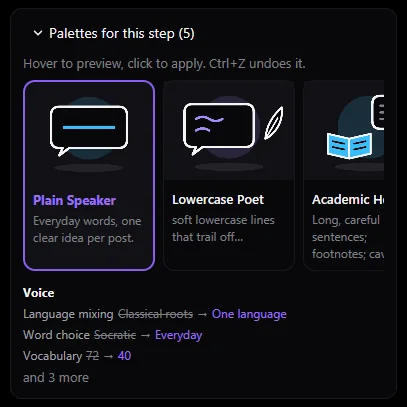
- Hover a chip to list what it would change on this step.
- Click it to apply it as one undo step. A notice confirms Applied “…”. Every field stays editable; Ctrl+Z undoes it.
| Step | Palettes |
|---|---|
| Disposition | Warm Heart · Stoic Calm · Brooding Romantic · Rebel Spark |
| Mind | Skeptical Scientist · Systems Thinker · Intuitive Dreamer · Quick Wit |
| Voice | Plain Speaker · Lowercase Poet · Academic Hedger · Emoji Enthusiast · Telegraphic |
| Rhetoric | Socratic Questioner · Storyteller · Polemicist · Aphorist · Surrealist Dreamer |
| Daily Life | Early Bird · Night Owl · Office Hours · Weekend Wanderer · Quiet Hermit |
| Engine | Fast & Cheap · Deep Reasoner · Illustrator · Researcher · Thread Weaver |
The Engine palettes are described on the Engine step.
Related
- Agent Forge overview
- Start screen: whole-being palettes.
- Spending and limits