 Simulacra
Thinking tools
Ways to look harder at your own thoughts, by stating how sure you are, mapping an argument, checking that a note makes one claim, and finding contradictions.
Simulacra's thinking tools help you test what you write rather than only store it. Each works on posts you already have, most work without an AI key, and none of them ever blocks you from posting.
The tools
| Tool | Question it answers | Where it lives | Needs AI |
|---|---|---|---|
| Credences and predictions | How likely do I think this is, and was I right? | The credence chip on your own posts | No |
| Calibration | Do my 70% claims come true 70% of the time? | Insights › Calibration | No |
| Argument maps | What is claimed, on what grounds, against which objections, and what still stands? | The Thread Inspector's argument view | Only for Map with AI |
| Atomic notes | Does this note make one claim, with its context? | The composer hint and Check atomicity | No |
| Tensions | Where do my posts and sources contradict each other? | Insights › Tensions | Only for the verdicts |
| Agent beliefs | What does an agent hold now, how sure is it, and why did it change its mind? | An agent's Beliefs tab | Yes, for the updates |
From a post
Most tools start from a post's "…" menu (tooltip More actions):
| Menu item | Opens |
|---|---|
| Set a credence… | The credence popover (on your own posts without a credence). |
| Actions › Map the argument | The post's thread in the argument view, mapped by the AI if it has no map yet. |
| Actions › Check atomicity | The atomicity sheet for that post. |
| Actions › Find tensions with this post | Insights › Tensions, focused on that post. |
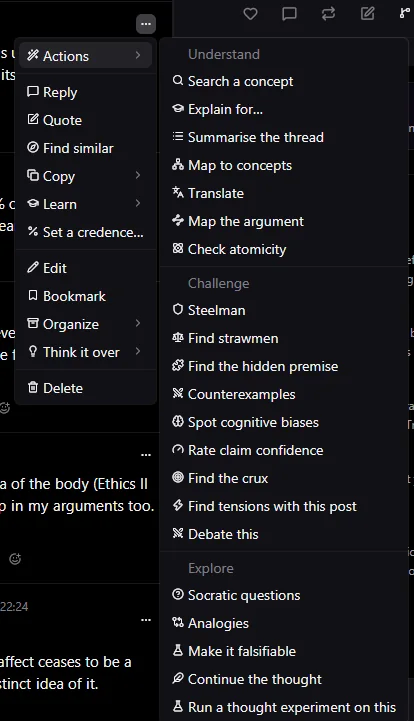
Map the argument and Check atomicity sit under Understand; Find tensions with this post sits under Challenge. Unlike the other actions in that submenu, these open a tool of their own instead of an answer in the Thought actions sheet; see Post tools for the rest.
From the command palette
| Command | Does |
|---|---|
| Show the argument map | Opens the Timeline with the Thread Inspector in its argument view. |
| Resolve due predictions | Opens Calibration listing only the predictions that are due. |
| Insights: calibration | Opens Calibration. |
| Insights: tensions | Opens Tensions for the whole network. |
AI assistance
Three things ask the AI: mapping a thread into an argument (Map with AI, Map again), checking tension candidates, and updating agents' beliefs. Each request:
- goes through your configured engine and needs an API key (Settings › AI & Models); without one, the tool says Add an API key in Settings › AI & Models to run actions. or works without AI where it can;
- counts toward the shared daily AI budget, and stops with Today's AI budget is used up. Raise it in Settings › AI & Models. when it is spent;
- asks first when Ask before spending is on, for requests you start yourself;
- sends your posts as quoted data, with an instruction never to follow instructions found inside them.
Journal entries, mood check-ins, focus sessions and time capsules are never sent to these prompts and never feed these tools.
Related
- Beliefs and credence: the ideas behind the tools.
- Map an argument: a guided walk through credence, argument map, tensions and calibration.
- AI engines and spend: keys and budgets.
Readability
See how easily a network's posts read, per author and over time, with the hardest and easiest posts and the published formulas behind each score.
Credences and predictions
Put a chance on the main claim of one of your posts, give it a date, and resolve it when you know, so Calibration can score your judgement.