 Simulacra
Tensions
Find posts and vault passages that may contradict each other, read the AI's verdict, and reconcile, resolve or dismiss each pair.
Tensions looks through a network's posts and vault documents for pairs that seem to disagree: the same topic, opposite claims. It is a prompt to think again, not a judge. You decide what each pair means: reply to reconcile it, mark it resolved, or dismiss it.
Open it
| Way | Scope |
|---|---|
| The Tensions tab of Insights, or the palette's Insights: tensions | The whole network. |
| A post's "…" menu › Actions › Find tensions with this post | Only pairs that include that post. |
Opening the tab starts a scan when your posts or vault have changed since the last one (or the focus changed); otherwise it shows the last result. The filter bar is not shown here: the finder looks at the active network as a whole.
Anatomy
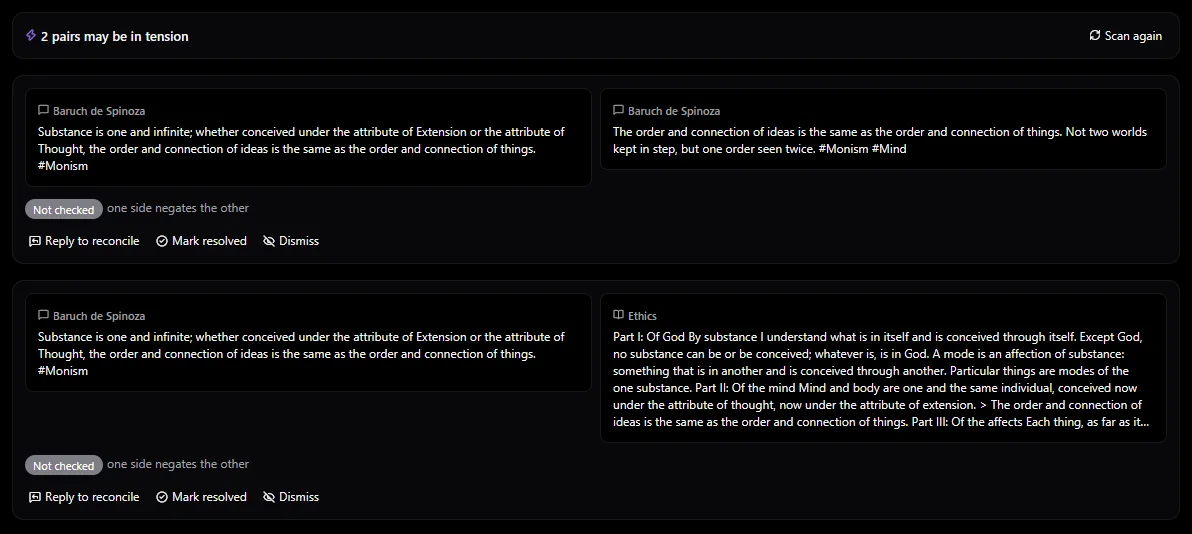
- Header card. The count (3 pairs may be in tension), or Looking for tensions… while it works, and Scan again.
- Focus chip. When you came from a post, Around: … with the post's opening words and a ×. Click it to drop the focus and search the whole stream.
- Notice, when the finder works with less than meaning and AI (see Modes), or when the last check failed.
- One card per pair, best candidates first.
A pair card

| Part | What it shows |
|---|---|
| Two sides | Side by side (stacked on a narrow page): each is a post, with its author's name, or a passage of a vault document, with the document's title. Click a side to open it. |
| Verdict | A badge and one sentence. Contradicts comes from the AI with its reason. Not checked means no AI verdict yet; the line then lists the surface signals that made it a candidate, such as one side negates the other or a word pair like always / never. |
| Reply to reconcile | Opens the composer: quoting one side (a post) and asking "How does this fit with [[the other]]?", or, for two passages, a new thread naming both. Edit and post it like any other thought. |
| Mark resolved | You have reconciled it (by a reply, an edit or a decision). The pair leaves the list. |
| Dismiss | Not a real tension. It is never shown again for these texts. |
How pairs are found
Same topic
A contradiction first needs a shared subject. Each post or passage with an embedding takes its eight nearest items in meaning (a similarity of at least 0.55). Items without an embedding pair up when they share at least two content words.
Opposite polarity
Each pair is read for signs of opposition on the surface: one side is negated and the other is not, the two sides use the opposite ends of a word pair (true / false, increase / decrease), or opposite quantifiers (always / never, all / none, must / must not). The vocabulary covers English, Indonesian, German, French, Spanish and Portuguese.
Ranking
The score adds the shared topic (45%) and the strength of the opposition (55%). A pair is kept only when it shows some opposition, or when its two sides are so close in meaning (0.85 or more) that a quiet disagreement is plausible.
AI check
With an AI key, unchecked candidates go to the model four pairs at a time, up to three batches per scan; the rest wait for the next scan. The model answers Contradicts, Compatible or Unrelated with a one-sentence reason. Pairs judged compatible or unrelated are hidden.
Every verdict, resolution and dismissal is remembered by a fingerprint of both texts. Edit either text and the pair counts as new, so a stale verdict or dismissal never sticks to changed words.
Modes
| Notice | Mode |
|---|---|
| None | Meaning and AI: candidates by meaning, each checked by the AI. |
| Without embeddings, these pairs are found by shared words; the AI still checks each one. | No embeddings available: candidates by shared words, still checked. |
| Without embeddings or an AI key, these pairs are found by words alone and are not checked. Add a key in Settings › AI & Models for meaning and verdicts. | No AI key: candidates by words and signals only, all Not checked. |
The finder works offline. An AI check is one request per batch of four pairs and counts toward the daily AI budget; with Ask before spending on, Scan again asks first.
Tips and limits
- The finder considers the 1,500 most recent posts of the active network (skipping plain reposts and empty posts) and the first 400 passages of its vault documents.
- After a scan finds nothing, the tab shows No tensions found; scan again after you write more.
- Without an AI key, Reply to reconcile, Mark resolved and Dismiss still work on unchecked pairs.
Related
- Thinking tools: the other ways to look harder at your thoughts.
- Beliefs and credence: tensions as prompts for revision.
- AI engines: keys and budgets.