 Simulacra
Argument maps
Lay a thread out as claims, grounds, warrants and objections joined by support and attack, and see which claims still stand.
An argument map turns a thread into its reasoning: what is claimed, on what grounds, by what rule, and against which objections. Simulacra then works out which claims stand once every attack is taken into account, and points at claims nothing supports, support that runs in a circle, and objections nobody has answered.
Open it
| Way | What happens |
|---|---|
| The Thread Inspector's View menu | Pick Show the argument map. The inspector shows the map of the open thread. |
| A post's "…" › Actions › Map the argument | Opens the post's thread in the argument view and, if the thread has no map yet, asks the AI to map it. |
| The palette's Show the argument map | Opens the Timeline with the inspector in its argument view. |
A map belongs to a whole thread (it is kept per thread root), so it is the same map whichever post of the thread you open it from.
| State | You see |
|---|---|
| No thread open | No thread selected: select a thought to see its argument. |
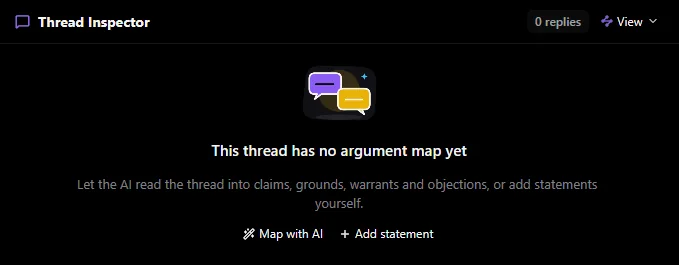
| Thread without a map | This thread has no argument map yet, with Map with AI and Add statement. |
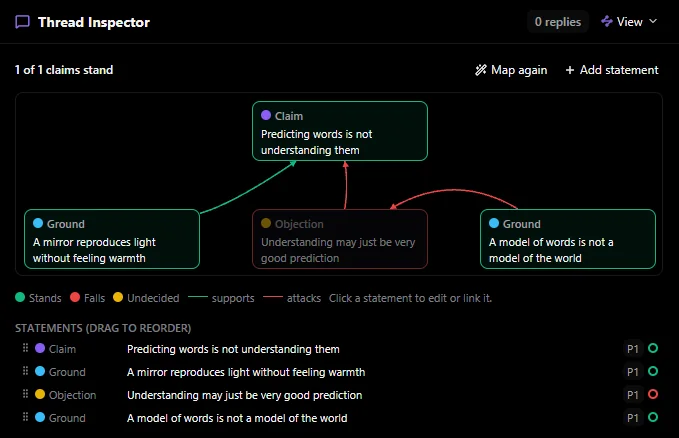
| Thread with a map | The toolbar, canvas, legend, findings, editor and statement list below. |
Anatomy
- Toolbar. How many claims stand (2 of 3 claims stand), Map again and Add statement. While the AI works, Map again becomes Stop.
- Status line. Reading the thread into an argument map… while it runs, a failure in red, or how many statements or links were left out.
- Canvas. One chip per statement, in tiers: claims and qualifiers on top, grounds and objections below them, warrants under those, backing at the bottom. Arrows run from a statement to the one it bears on: green for support, red for attack. A chip's frame shows its standing.
- Legend. The three standings and the two arrow kinds, with Click a statement to edit or link it. while nothing is being edited.
- WHAT THE ANALYSIS FOUND, when there is something to report. Click a finding to edit its statement.
- Editor, while you edit or write a statement.
- STATEMENTS (DRAG TO REORDER): every statement as a row.
Roles
| Role | Says | Tier on the canvas |
|---|---|---|
| Claim | What someone wants the reader to accept. | Top |
| Qualifier | How strongly the claim is put ("probably", "in most cases"). | Top |
| Ground | The facts or reasons offered for a claim. | Second |
| Objection | A circumstance or counter-argument that would defeat the claim. | Second |
| Warrant | The general rule that licenses the step from grounds to claim. | Third |
| Backing | Why the warrant itself should be trusted. | Bottom |
These are Stephen Toulmin's parts of an argument. Links between them are of two kinds: supports (a reason to accept the target) and attacks (a reason to reject it).
Map with AI
Map with AI sends the thread to the model, which answers with statements (each citing the post it comes from) and the links between them. The result replaces the current map. Map again does the same on a mapped thread, so manual edits are lost.
- The AI reads the root and up to the first 23 replies, up to 1,200 characters of each, and proposes at most 24 statements.
- Anything that cites no post of the thread, or a link to a statement that does not exist, is dropped: N statements or links were left out because they cited nothing in the thread.
- If the answer is unreadable: The answer could not be read as an argument map. Try again.
- Stop cancels a running request.
It needs an AI key and counts toward the daily budget; see AI assistance.
Build or edit by hand
Add a statement
Click Add statement. In the New statement card, write it in a few words, pick its role, and under Cites pick the post it comes from (P1 · author is the root, then the replies in reading order). Click Save. The card switches to editing the new statement.
Link it
In the Edit statement card, click Supports… or Attacks…; the hint Now click the statement this one bears on. appears. Click the target chip on the canvas. Clicking the same button again cancels.
Adjust
Click any chip or row to edit it: change its text and Save, change its role, or Remove it (with its links). Each link of the statement is listed with its kind: the swap button (Switch between support and attack) flips it, the cross (Remove this link) deletes it. Close the card with ×.
Reorder
Drag a row of the statement list by its handle onto another row. The order sets where chips sit within their tier.
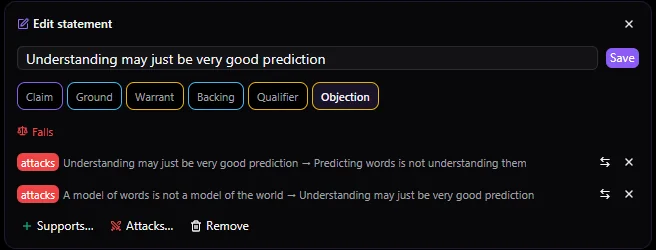

Every edit is saved at once. A statement keeps at most 280 characters, and an edit that would break the map (a link to itself, or a second link in the same direction) is refused. In the list, the P2 tag of a row opens the post the statement cites.
What stands
Each statement gets a standing, shown on its chip and in the list:
| Standing | Chip | Means |
|---|---|---|
| Stands | Ringed in the success colour | Every attack on it is answered by a statement that falls. |
| Falls | Dimmed | A statement that stands attacks it. |
| Undecided | Ringed in the warning colour | Neither: for example two statements attacking each other with nothing to break the tie. |
The labelling is the grounded one from argumentation theory: start by accepting every statement nobody attacks, reject what they attack, and repeat until nothing changes. It is the most cautious position that every reasonable reader shares. Support counts too: if A supports B and B attacks C, then A also attacks C.
Findings
| Finding | Means |
|---|---|
| Nothing supports the claim “…”. | A claim with no supporting link. |
| Circular support: … → …. | Statements that support each other in a loop, so the argument leans on itself. |
| Nobody has answered the objection “…”. | An objection (or anything attacking a claim) that nothing attacks. |
Related
- Beliefs and credence: standing, credence and revision.
- Map an argument: build a small map step by step.
- Views: the Thread Inspector's other views.
Credences and predictions
Put a chance on the main claim of one of your posts, give it a date, and resolve it when you know, so Calibration can score your judgement.
Atomic notes
Check that a post makes one claim with enough context to stand alone, and split it into one post per claim when it does not.