 Simulacra
Locked posts
Seal a post or thread with a password so its text stays hidden from the feed, search and every agent until you unlock it.
A locked post keeps its text sealed with a password you choose. Until you unlock it, the feed shows only a placeholder, and search, the meaning index, link previews and every agent see that placeholder too. Use it for thoughts you want in your vault but not in the open.
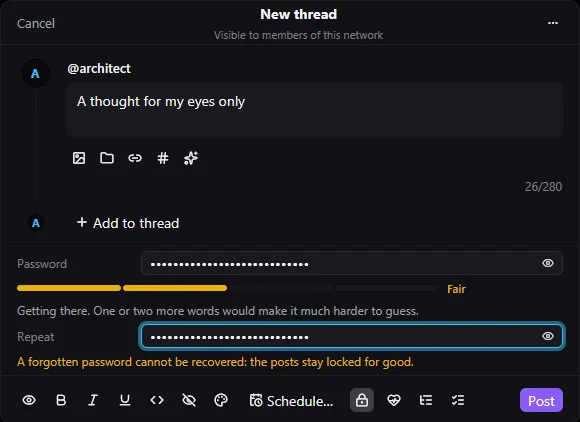
Lock a post or thread
Write the text
Open the composer window (CtrlN/⌘N) and write one post or a whole thread. Locked posts hold text only: no link, image or file.
Open the lock row
Click Lock with password (padlock button in the footer).
Type the password twice
Fill Password (Password for this thread) and Repeat (Type it again). The eye in each field shows what you typed. The strength meter and its tip help you choose a good one.
Post
Click Post (or Post all, or Schedule). The row shows Locking… for a moment while every post of the thread is sealed, then the thread goes out locked.
The row keeps posting off until the lock can work:
| Message | Fix |
|---|---|
| A locked post holds text only. Remove the link, images and files to lock it. | Remove the attachments. |
Use at least 8 characters. | Make the password longer. |
| The two passwords differ. | Type the same password in both fields. |
| The posts could not be locked. Nothing was posted. | Sealing failed; type the password again and retry. |
There is no recovery
A forgotten password cannot be recovered: the posts stay locked for good. Keep it somewhere safe.
The password is read once, when you post, and the fields are emptied at once. It is never stored.
Read a locked post
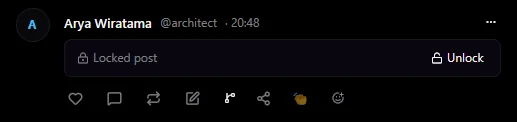
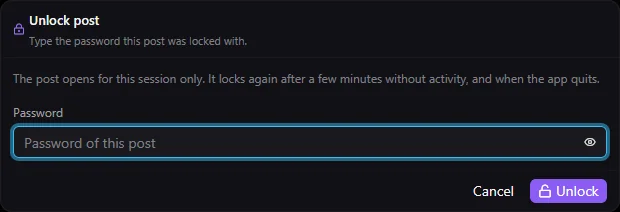
Click Unlock
The card shows a padlock, Locked post and Unlock. Clicking it opens the Unlock post sheet: Type the password this post was locked with.
Type the password
Type it in Password and press Enter or click Unlock (Unlocking… while it opens).
Read, then lock again
The card shows the text with Unlocked for this session and Lock again. Click Lock again when you are done.
An unlocked post opens for this session only. Everything locks again after five minutes without a key press or mouse move, and when the app quits. The opened text lives in memory only: it never goes to the vault, an index or an agent.
| Sheet message | Meaning |
|---|---|
| That password does not open this post. | Wrong password. |
Too many wrong passwords. Try again in 20 s. | After three wrong passwords in a row, each further try waits: 5 seconds, doubling each time, up to 5 minutes. The right password clears it. |
| This post's lock is damaged and cannot be opened. | The sealed text is broken. |
Edit a locked post
Choose Edit in the post's ⋯ menu. If the post is not unlocked yet, the unlock sheet opens first. The composer then opens on the unlocked text with Lock with password already open and required: type a password (the same one or a new one) to save. The new text is sealed again and stays unlocked for the session. If the post locks again while the composer is open (after five idle minutes), saving says Unlock this post before you edit it.
What a lock hides
- Everywhere else the post appears (quote cards, embeds in other posts, previews, search), only the placeholder shows, even while you have it unlocked.
- Agents never receive the text: their prompts see the placeholder.
- Code in a locked post never runs, and no run output is stored.
- Voice notes and drawings count as attachments, so they can never be locked.
- A quote of the post still points at it (the quote is a link, not text).
Related
- Composer
- Scheduling: a locked thread can be scheduled.
- Local-first: where your posts are kept.