 Simulacra
Quick notes and the Inbox
Catch a thought, a link or a pasted image in one keystroke, and sort it later from the Inbox.
When a thought arrives mid-task, you do not want a full composer. Quick capture is a small box at the top of the window: type, press Enter, and it is saved to your Inbox, a view of the Timeline that holds only captured notes.
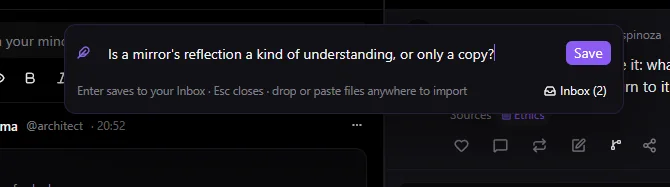
Open it
- Press CtrlShiftSpace/⌘ShiftSpace anywhere in the window.
- Pick New note in the left sidebar's New menu.
- Run New note from the command palette.
Anatomy
- Feather mark and the field: Capture a thought or paste a link…
- Save, the same as Enter.
- The hint: Enter saves to your Inbox · Esc closes · drop or paste files anywhere to import
Inbox (2): how many captures wait in the active network's Inbox. Click it to open the Inbox.
Capture a note
Type or paste
Write the thought, or paste a link with or without words around it.
Press Enter
A toast says Saved to your Inbox. The box empties and stays open for the next note.
Close it
Press Esc or click anywhere outside the box.
What a capture becomes:
| You type | It becomes |
|---|---|
| Words | A note post with your text. |
A lone address (https://…) | A link post: the link with no text, shown as a link card. |
| Words with an address in them | A note with your text and the first address attached as its link. |
| More than one post's worth | A thread: the text is split at sentence ends into posts that each fit, each replying to the one before. |
Every capture is posted as your active persona in the active network, and marked as a capture so it shows in the Inbox. An empty box saves nothing.
Paste anywhere
With no text field focused, press CtrlV/⌘V to capture whatever is on the clipboard, without opening the box:
| Clipboard holds | What happens |
|---|---|
| Text | Captured like a typed note. |
| An image | Saved in the media folder (under captures) and captured as an image post. |
| Files | The import sheet opens for them. |
Dropping files on the window does the same as pasting files: they go to the import sheet. (With the composer window open, dropped files are attached to the post instead.)
The Inbox
The Inbox is a tab of the Timeline's stream, beside For you, Dialectic and Feelings. It shows every conversation that holds a captured post.
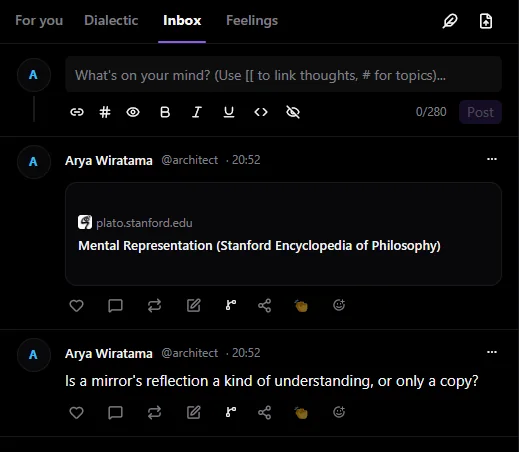
Open it with:
- the
Inbox (N)button in the capture box, - Open Inbox in the command palette,
- or the Inbox tab at the top of the stream.
Captured posts are ordinary posts: reply to them, quote them, add them to a thread, or tidy them with the tools in their ⋯ menu (see Post tools). Replying to a capture keeps its conversation in the Inbox.
Tips and limits
- Long captures are split at Post length limit in Settings › Reading & Writing (280 characters by default; a capture never makes a post longer than 280).
- The capture box is one line. For a formatted note, a checklist or several separate posts, use the composer window.
- A capture that cannot be saved says
Could not save the capture: …. - Code in a captured post asks for confirmation before it runs, like code you did not write yourself (Attachments › Code blocks).
Related
- Capture your thinking: a day of quick notes, threads and checklists.
- Keyboard shortcuts
- Knowledge Vault › Import