 Simulacra
Encrypted snapshots
Seal a complete copy of your vault with a passphrase, and restore one after checking it, with your current vault kept as a copy.
An encrypted snapshot is the whole vault, sealed with a passphrase into one .simsnap file. It is the safe way to keep a copy on a USB stick or a cloud drive, and the way to move your vault to another computer: without the passphrase the file is unreadable.
Create a snapshot
Open it from Settings › Privacy & Data › Encrypted snapshot › Create snapshot, or the command palette: Encrypted snapshot….
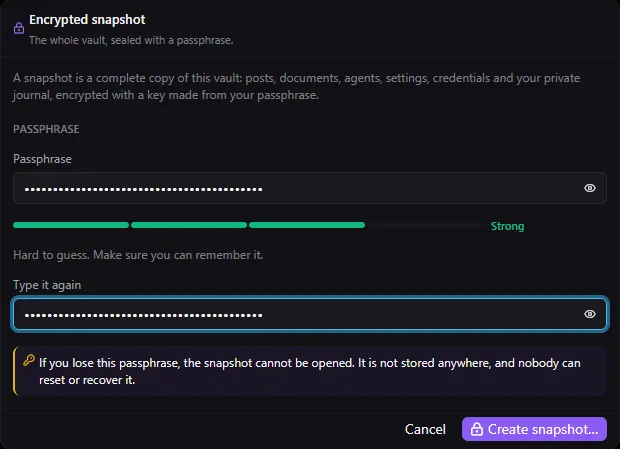
The sheet explains: A snapshot is a complete copy of this vault: posts, documents, agents, settings, credentials and your private journal, encrypted with a key made from your passphrase.
Type a passphrase
Type it into Passphrase (A long phrase only you know). The eye button shows or hides it. Use at least 8 characters; several unrelated words are easy to remember and hard to guess.
Read the meter
A four-part meter rates it Weak, Fair, Strong or Very strong, with a tip under it.
Type it again
Repeat it in Type it again. Until both match and are long enough, a line says Use at least 8 characters. or The two passphrases differ. and the button stays disabled.
Seal
Click Create snapshot… and choose where to save. The name proposed is simulacra-YYYYMMDD-HHMMSS.simsnap. The button reads Sealing…, then a toast says Encrypted snapshot saved to ….
A lost passphrase cannot be recovered
If you lose this passphrase, the snapshot cannot be opened. It is not stored anywhere, and nobody can reset or recover it. Write it down somewhere safe before you rely on the snapshot.
The strength meter
The meter estimates how hard the passphrase is to guess, cautiously: by its length and the kinds of characters in it (a repeated character or a run such as abc counts for little), and, for a phrase of several words, by the number of words. The lower estimate wins. It cannot know that a phrase is a famous quotation, so treat it as a hint.
| Level | Tip shown |
|---|---|
| Not set | Several unrelated words make a passphrase that is easy to remember and hard to guess. |
| Weak | Easy to guess. Make it longer, or add more unrelated words. |
| Fair | Getting there. One or two more words would make it much harder to guess. |
| Strong | Hard to guess. Make sure you can remember it. |
| Very strong | Very hard to guess. Keep it somewhere safe. |
Restore a snapshot
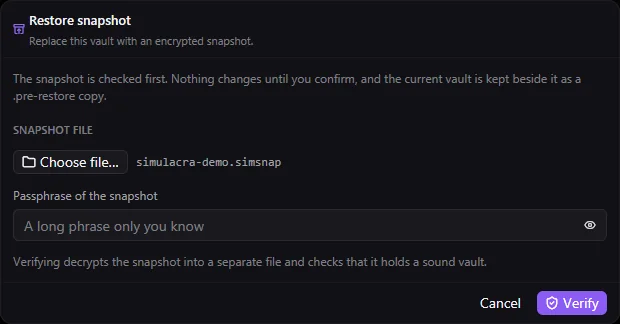
Open it from Settings › Privacy & Data › Restore a snapshot › Restore, or the command palette: Restore snapshot…. The sheet says: The snapshot is checked first. Nothing changes until you confirm, and the current vault is kept beside it as a .pre-restore copy.
Choose the file
Click Choose file… and pick a .simsnap file (Simulacra snapshot). Its name appears beside the button.
Verify it
Type its passphrase in Passphrase of the snapshot and click Verify. Verifying decrypts the snapshot into a separate file and checks that it holds a sound vault.
Read what it holds
A green notice says, for example, Verified. Snapshot from …: 120 posts, 14 profiles, 3 documents. and an amber one warns: Restoring replaces everything in this vault with the snapshot, then restarts the app. The current vault is kept as a .pre-restore copy.
Restore
Click Restore and restart. Simulacra keeps your current vault, swaps the snapshot in and starts again on it.
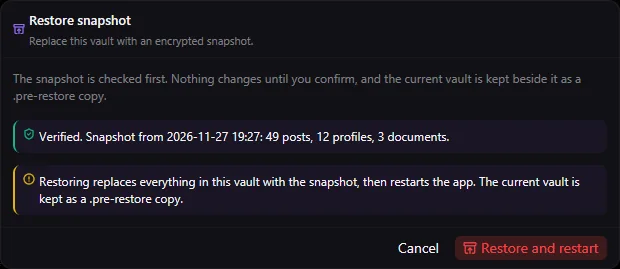
Cancel at any point leaves your vault untouched and deletes the decrypted copy. Choosing another file starts again from the first step.
What happens to your current vault
Before anything is replaced, the current database is copied to simulacra.db.pre-restore beside it (or simulacra.db.YYYYMMDD-HHMMSS.pre-restore when an earlier copy is already there). To go back, quit Simulacra and make that copy your simulacra.db again (see Storage and backups).
Errors
| Message | Why |
|---|---|
| The passphrase is wrong, or the file was changed after it was sealed. | The passphrase does not open it, or a byte of the file changed. The two cannot be told apart. |
| This file is not a Simulacra snapshot. | The file does not start like a snapshot. |
| This snapshot was made by a newer version of the app. | Update Simulacra, then try again. |
| This snapshot is incomplete: the file ends too early. | The file was cut short, for example by an interrupted copy. |
| This snapshot is damaged. | Its header is inconsistent. |
| The key could not be derived with this snapshot's settings. | The key settings stored in the file were refused. |
| The snapshot opened but does not hold a sound vault: … | It decrypted, but the database inside failed its check. Nothing was changed. |
| The file could not be read: … | The file could not be opened. |
| The snapshot could not be made: … | Creating failed, for example because the folder is not writable. |
| The restore failed: … | The swap failed; read the reason. |
How the seal works
| Key | Derived from your passphrase with Argon2id (64 MiB of memory, three passes, one lane: about half a second on a laptop) and a random 16-byte salt. |
| Encryption | XChaCha20-Poly1305 with a random 24-byte nonce. Salt and nonce come from the operating system's random generator and are new for every snapshot. |
| Tamper check | The file header (format version, key settings, salt, nonce, creation time, length) is authenticated with the contents, so changing any byte makes opening fail. |
| Passphrase | Never stored, logged or written to the database. The fields are emptied as soon as it is read, and the key and decrypted bytes are wiped from memory when no longer needed. |
| Restore check | The decrypted database is written to a separate file beside the vault, opened read-only, checked for integrity and for the tables every vault has, and counted. Only then can you confirm. |
The cryptography comes from the RustCrypto libraries; nothing is home-made.
Tips and limits
- The database only. A snapshot holds the database. The
media,avatarsandsymbolsfolders are not in it: copy them separately to keep images, avatar photos and icon sets. - Everything comes back. A restore brings back the snapshot's settings too, including the code-running switch and the API keys. Code in restored posts by your own personas runs without a confirm, as it would have before.
- A plain copy waits briefly. While sealing, a plain copy of the vault sits beside it for a moment and is deleted as soon as it is read.
Related
Export
Save the active network, a collection, a date range or one persona as a zip of Markdown, CSV and JSON files that any other app can open.
Version history
How Simulacra keeps every earlier version of your posts and vault documents, how versions are numbered, how to restore a document's old text, and where versions go in backups and exports.