 Simulacra
Version history
How Simulacra keeps every earlier version of your posts and vault documents, how versions are numbered, how to restore a document's old text, and where versions go in backups and exports.
Nothing you edit is overwritten. Each edit of one of your posts, or of a vault document's text, title or catalogue record, keeps the version it replaces. A post's versions are numbered like software: v1.0.0 is the original, and each edit moves the number on.
This page covers what versions are and the history of vault documents. The history sheet of a post (comparing, showing an older version, editing from it) is described in Version history of posts.
How versions are numbered
When you edit a published post, the composer's version row shows the step (v1.0.0 → v1.0.1), the part of the number it suggests bumping, and an optional edit note. You can pick another part than the suggestion. See Edit a post.
| Bump | Suggested when | Example |
|---|---|---|
| Patch | At most three words added and at most three removed: a typo, a swapped word, a missing "not". Changes of letter case, punctuation or spacing alone are a patch. | v1.0.0 → v1.0.1 |
| Minor | An addition or extension that keeps most of the old text. | v1.0.1 → v1.1.0 |
| Major | A rewrite: every old word gone, or more than three words and at least half of the old ones removed. | v1.1.0 → v2.0.0 |
A major bump resets the minor and patch numbers; a minor bump resets the patch. A reply written to an earlier major version of its parent shows a quiet replied to v1.x, so readers know it answered an older text.
Editing from an older version (Edit from this version) starts a branch: the history becomes a tree, drawn with graph lanes like a code history.
The history of a vault document
A document's history works like a post's, with one difference: instead of choosing which version to show, you restore an old one.
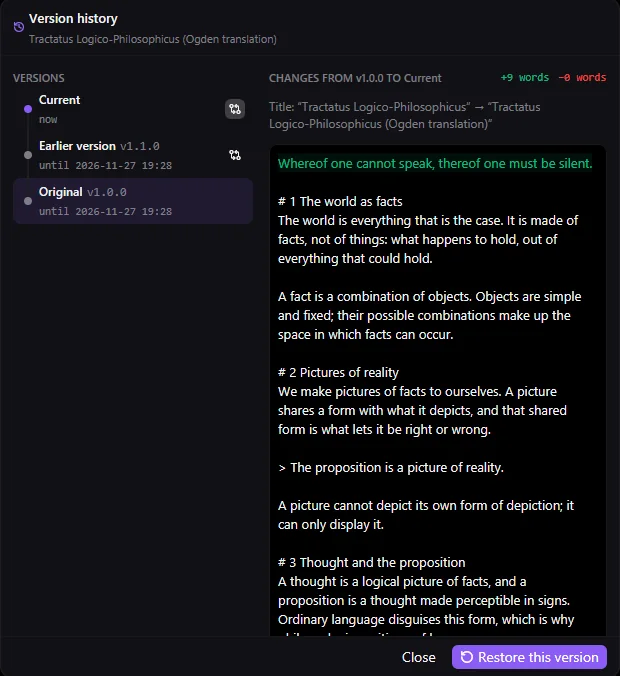
Open it
Open the document in the Knowledge Vault and click History on its entry.
Pick the version
The sheet, titled Version history with the document's title, lists every version newest first. Click a row to make it version A; its B button makes another row version B (the current one to start with). The right side shows CHANGES FROM … TO …, the words added and removed, and Title: “…” → “…” when the title changed.
Restore it
Click Restore this version. Version A becomes the current text, title and catalogue record again, as a new edit, so the version it replaces is kept too: Version restored. The one it replaced is kept in the history.
Restore this version is disabled while version A is the current one. With a single version the sheet says No earlier versions yet. Every edit keeps the version it replaces.
Posts and documents compared
| Posts | Vault documents | |
|---|---|---|
| What is versioned | The text, plus its tint, symbols, link and images | The text, the title and the catalogue record |
| Bump choice and edit note when saving | Yes | No |
| Going back | Show this version (the post shows it; nothing new is written) | Restore this version (written as a new edit) |
| Branches | Edit from this version | No |
| Edit log | Yes | No |
Where versions go
| Versions included? | |
|---|---|
| The vault | Yes, every version, in the database. |
| Back up now and encrypted snapshots | Yes: they copy the whole database. |
| An export bundle | No: it writes the version each post shows and each document's current text. |
| A deleted post | Its earlier versions are deleted with it. |
Tips and limits
- Real edits only. Saving a text that differs only by surrounding spaces keeps no new version.
- Very large rewrites are compared as one removal and one addition rather than word by word, so the sheet never stalls.
- Your own posts only. Edit is offered on the posts you wrote.