 Simulacra
Version history
Every version of an edited post as a tree, a word-by-word comparison of any two, and which version the post shows.
Editing a post never throws its old text away. Each save keeps the version it replaces, so an edited post carries its whole history: you can compare any two versions word by word, show an older one again, or start a new edit from it.
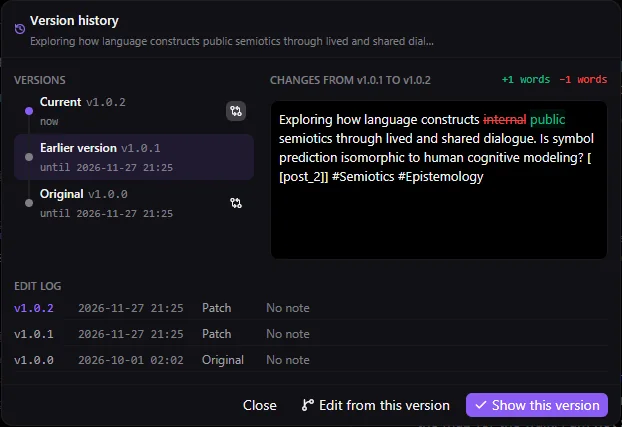
Open it
- Click the quiet "edited" mark in the card's header (tooltip "This post was edited. Open its history.").
- Or click … › Organize › History (N), where N counts the earlier versions.
Both appear only once the post has been edited. To edit it, use … › Edit; see the composer.
Anatomy
- Title. Version history, with the post's opening words.
- VERSIONS. Every version as a tree, the newest edit first, with lanes on the left where an edit started from an older version. Each row says Current, Earlier version or Original, its version number, and "now" or "until" the time it was replaced. A depth-dial rendering is marked "Simpler rendering" or "Expert rendering".
- The comparison. "CHANGES FROM A TO B" with words added and removed ("+12 words", "−3 words"), and notes when the tint, the symbols, or the link and images changed.
- EDIT LOG. Each edit with its kind (Patch, Minor or Major, or Original), its time and its note ("No note" when you left none).
- Buttons. Close, Edit from this version and Show this version.
Compare two versions
The sheet opens comparing the most recent earlier version (A) with the current one (B).
- Click a row to make it A.
- Click another row's compare button (two crossing arrows, tooltip Compare with this version) to make it B. The button is lit on version B, and the selected row (A) has none: a version is not compared with itself.
If A and B ever end up the same version, the sheet says "Pick two different versions: click one row, then the compare button of another."
Show an older version, or edit from it
| Button | What it does |
|---|---|
| Show this version | The post shows version A from now on. Every other version is kept: "Now showing v1.0.0. Every other version is kept." |
| Edit from this version | Opens the composer on version A's text. Saving adds a new version that branches from A in the tree. |
Both are disabled while A is the version the post already shows.
Tips and limits
- Replies remember which version they answered. Once the parent post moves on to a new major version, the reply says "replied to v1.0.0".
- An embed copied with Copy embed is pinned to the version shown when you copied it.
- A Still true? check restarts from the newest edit.