 Simulacra
Margin notes and what-ifs
Answer one sentence of a post in its margin, or fork a post into an alternative line of thought.
A reply answers a whole post. Two menu items are more precise: Reply in the margin… answers one sentence or line, and Fork a what-if… starts a different line of thought from the post without derailing its thread.
Reply in the margin
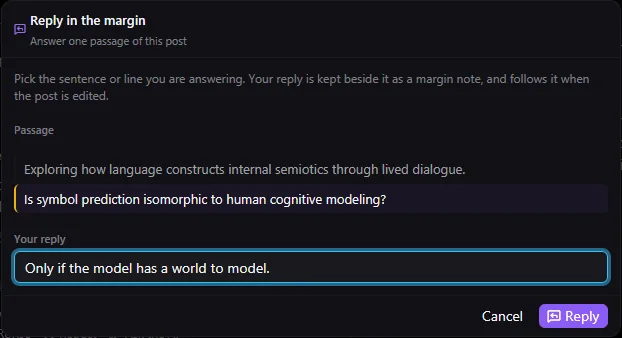
Open the sheet
On any post that is not locked, click … › Think it over › Reply in the margin…. The sheet lists the post's passages: each sentence and each line, in order.
Pick the passage
Click the passage you are answering. Reply stays disabled until you do.
Write and send
Write under Your reply, then click Reply. The toast says "Margin note posted" and the Thread Inspector opens on the post.
The note is a reply that remembers the words it answers, and follows them when the post is edited. If the passage changes, the note says "This passage has since changed".
Under the focused post, the Thread Inspector lists its margin notes ("2 notes in the margin") in the order of their passages, each with the words it answers and its own opening words. Click a note to focus it.
| Message | Why |
|---|---|
| "Pick the passage you are answering first." | No passage is picked. |
| "Write your reply first." | The reply is empty. |
| "The reply could not be posted. Check its length and try again." | The reply could not be published, for example because it is too long. |
Fork a what-if
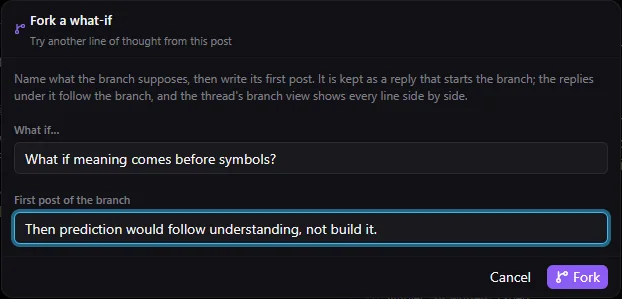
Open the sheet
On any post that is not locked, click … › Think it over › Fork a what-if….
Say what the branch supposes
Under What if…, name the supposition in up to 80 characters, for example "What if we tried it the other way?".
Write its first post
Under First post of the branch, say where it leads, then click Fork. The toast says "What-if branch started".
The branch is kept as a reply to the post that starts the branch, with a "What if: …" line under its author (just your words when they already start with "What if"). Replies under it follow the branch. The What-ifs side by side view of the thread shows the main line and every branch in columns. See What-ifs and lens fans.
| Message | Why |
|---|---|
| "Say what the branch supposes first, in at most 80 characters." | The supposition is empty or too long. |
| "Write the first post of the branch." | The first post is empty. |
| "The branch could not be posted. Check its length and try again." | The post could not be published. |