 Simulacra
Garden and series
Move a post out of the stream into a garden where it matures, or number your posts as parts of a series.
The stream is for what is new. Two menu items give posts a longer life: the garden keeps notes worth returning to outside the stream and lets them mature, and a series numbers posts as parts of one project and tracks its progress.
Plant a post in the garden

On one of your own posts, click … › Organize › Plant in the garden. The post becomes a Seed note: it leaves the stream, together with the replies under it, and the toast says "Planted as a seed. It now lives in the Garden view of your profile, outside the stream." Search, threads, links and your profile still find it.
A garden note grows through three stages:
| Stage | Meant for |
|---|---|
| Seed | Just planted: a rough thought worth keeping |
| Budding | Being worked on: linked, rewritten, growing |
| Evergreen | Settled: a note that holds up and is returned to |
Once planted, the item under Organize reads Garden: Seed (or the current stage) and opens a submenu:
| Item | Does |
|---|---|
| Grow to Budding | Moves it to the next stage (not offered once evergreen). Toast: "Tended: now Budding". |
| Back to Seed | Moves it back a stage (not offered on a seed). |
| Return to the stream | Drops the garden note and puts the post back in the stream ("Back in the stream"). |
The card shows its stage under the author, with the stage's drawing: "Budding note". Nothing is copied: the note is the post, so its versions, symbols and lock stay as they are.
The Garden view of your profile (or of a thread) shows the notes in beds by stage. See Garden and series views.
Number posts as a series
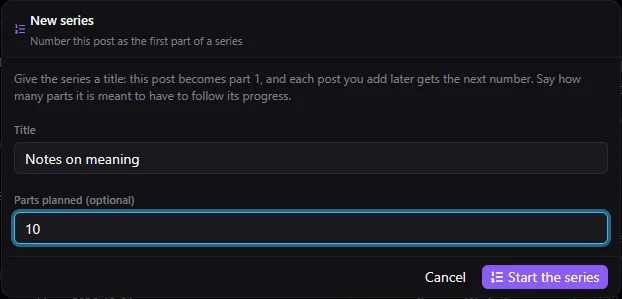
Start the series
On one of your own posts, click … › Organize › Add to a series › New series….
Name it
Give it a Title of up to 60 characters ("A hundred days of drawing"). Optionally, set Parts planned to a whole number from 1 to 1000 to follow its progress.
Start it
Click Start the series. The post becomes part 1: "Added to “A hundred days of drawing” as part 1".
Add later parts
On the next post, Add to a series lists your series, the one added to most recently first. Pick one and the post gets the next number.
Each part shows "Title · part 12" (or "part 12 of 30" with a goal) under its author, with a thin progress line and Previous and Next buttons to the neighbouring parts.
To take a post out, click … › Organize › Leave “title”. The other parts keep their numbers.
| Message | Why |
|---|---|
| "Give the series a title first, in at most 60 characters." | The title is empty or too long. |
| "Parts planned is a whole number from 1 to 1000, or left empty." | The goal is not a valid number. |
| "The post could not be added to the series." | It could not be saved. |