 Simulacra
Translations
Read any post in the language you are learning, and send its words to review as vocabulary cards.
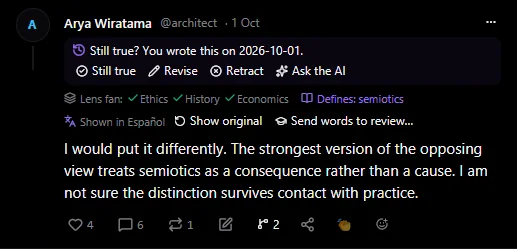
If you are learning a language, your own stream is good reading material. Show in … puts any post into the language you are learning, keeps the translation with the post, and lets you send its words to review.
Choose the language
Set Settings › Learning › Language I am learning. It starts as Spanish, so the menu item reads Show in Español. The menu names the language in its own script.
Show a post in that language
Ask for it
On any post that is not locked, click … › Think it over › Show in Español.
Wait for the first translation
The line under the author reads "Translating…" while the AI engine works (after the spend check). Only one post is translated at a time.
Read it
The translation replaces the body, and the line reads "Shown in Español" with Show original and Send words to review….
The translation is kept on the post. Showing it again later is instant and costs nothing, as long as you are still learning the same language; after you switch languages, the next Show in … asks for a new translation.
Which posts show translated is remembered only for the session: after a restart every post shows as written until you ask again.
The model is asked to keep the tone and line breaks, to leave wikilinks, hashtags, mentions and URLs exactly as they are, and to prefer clear, everyday words a learner can look up. A translation longer than 2,000 characters is not kept.
Send words to review
Open the sheet
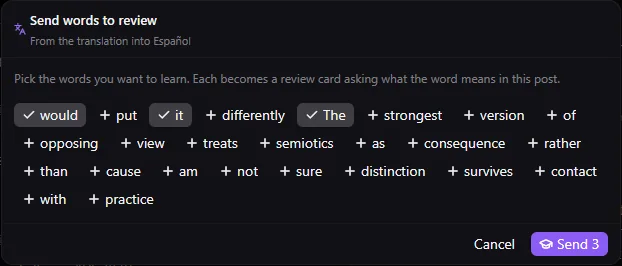
Click Send words to review… on the translation line or under … › Think it over.
Pick words
The sheet lists up to 30 distinct words of the translation. Click the ones you want; the button counts them, "Send 3".
Send
Each word becomes a review card asking "What does “palabra” (Español) mean in this post?", with the post as the answer. The toast says "3 words sent to review".
Cards are tagged vocabulary and with the language's code, so you can find them under the Review page's items. See Review.
Problems
| Message | Why |
|---|---|
| "No translation: …" | The request failed, or the answer was empty or too long. The reason follows. |
| "Pick a word first." | You clicked send with no word picked. |