 Simulacra
Bookmarks and collections
Keep posts to come back to, alone or with vault documents in ordered collections with notes, on the Saved shelf.
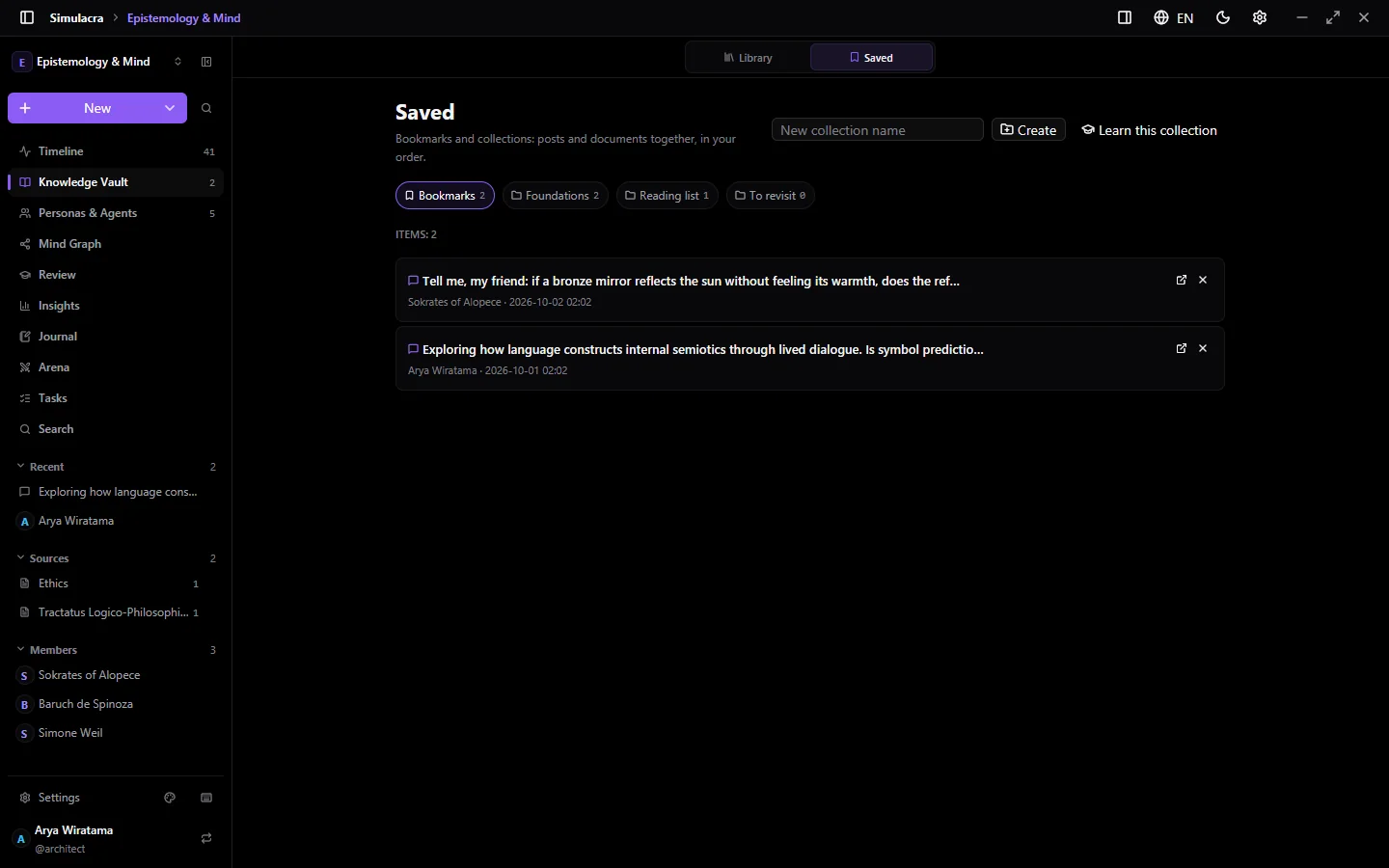
A bookmark keeps a post one click away. A collection goes further: it gathers posts and vault documents in your own order, each with a note on why it belongs. Both live on the Saved shelf of the Knowledge page.
Bookmark a post
- Click … › Bookmark on any post. The toast says "Bookmarked." and the item turns into Remove bookmark.
- Or, with the post open in the Thread Inspector, run Bookmark this post from the command palette (CtrlShiftP/⌘ShiftP). It toggles the same way. Without a post open it says "Open a post in the inspector first."
Add a post to a collection
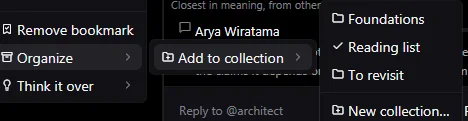
Click … › Organize › Add to collection. The submenu lists the active network's collections by name:
- Click a collection to add the post at its end ("Added to Reading list."). A ticked collection already holds it; clicking it takes the post out.
- Click New collection… to create one. The Saved page opens with the name field focused; type a name and click Create, and the post is filed in the new collection.
Collections are the vault's own collections, so documents filed under one in the Knowledge Vault appear in it too.
The Saved page
Open it with Saved in the switch at the top of the Knowledge page (Ctrl2/⌘2), or with Open collection… in the command palette.
- Header. Saved, "Bookmarks and collections: posts and documents together, in your order.", the New collection name field with Create, and Learn this collection.
- Shelf chips. Bookmarks and every collection, each with its item count. Click one to show it.
- The count, "ITEMS: 4", and in a collection the hint "Drag a row by its grip to reorder."
- Rows. Each shows the item's kind, its title (the post's opening words or the document's title) and a byline (author and time, or document kind and creators), with Open and Remove from this shelf buttons.
| In a collection you can | How |
|---|---|
| Reorder | Drag a row by its grip onto another row. |
| Add a note | Click Add a note…, write why it belongs, click Save note. |
| Remove an item | Click the remove button. A document is unfiled from the collection; it stays in the vault. |
Bookmarks cannot be reordered and carry no notes. Removing a bookmark from the shelf is the same as Remove bookmark.
Open shows a post on the Timeline, or a document in the vault.
Learn a shelf
Learn this collection turns the shelf you are looking at (bookmarks or a collection) into a connection map titled "Collection: name", opened in the Review page's map editor. It is disabled while the shelf is empty. See Connection maps.
Empty shelves
- "No bookmarks yet": "Bookmark any post from its … menu to find it here."
- "This collection is empty": "Add posts from their … menu, or file documents under it in the vault."