 Simulacra
Search by meaning
Find posts and vault documents that say what you mean, even in other words, once an embedding provider is set up.
Search by meaning finds posts and documents that are close to a question or an idea, not only those that share its words. Ask "where do our ideas come from?" and a passage about impressions and sense experience can come up although it never uses the word "ideas".
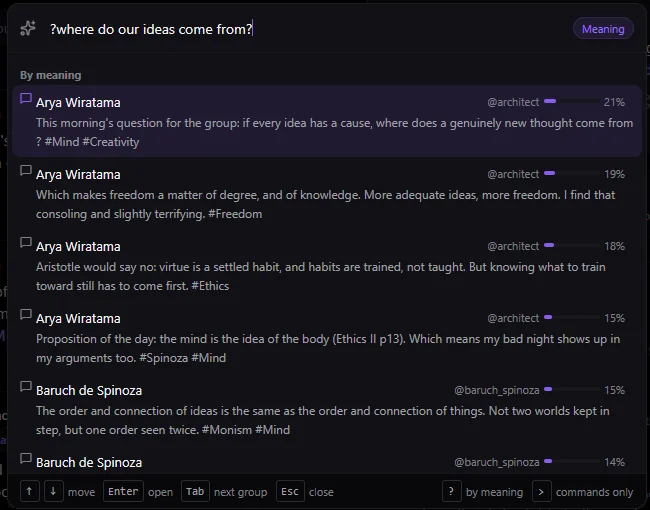
It works by turning every post and document into vectors (embeddings) with an embedding provider you choose, then comparing your query's vector with them. Search by meaning, explained describes how.
Set it up
Choose a provider
Open Settings (Ctrl,/⌘,) › Embeddings and pick an Embedding provider:
| Provider | Needs | Default model |
|---|---|---|
| Gemini (the default) | A Gemini key | gemini-embedding-001 |
| Local server | An embedding server on your computer, such as one serving embeddinggemma | embeddinggemma |
| OpenAI | An OpenAI key | text-embedding-3-small |
| Custom | Any OpenAI-compatible service; a key if it asks for one | text-embedding-3-small |
Add the key or address
Keys go in Settings › AI & Models, with your other credentials (see AI engines). If Gemini is already your text provider, its key is used. A local server or custom service listens at Local server address, http://localhost:11434 unless you change it.
Let it index
Leave Semantic search on (it is on by default). Indexing starts by itself in the background, and a small pill in the bottom-right corner shows its progress.
Embedding settings
| Setting (Settings › Embeddings) | What it does | Default |
|---|---|---|
| Embedding provider | The service that turns text into vectors | Gemini |
| Embedding model | The model id; blank uses the provider's default. Switching provider moves a default model to the new provider's default and keeps one you typed. | gemini-embedding-001 |
| Local server address | Where a local server (or a custom service) listens | http://localhost:11434 |
| Vector size | Numbers per vector, 128 to 3072. Smaller is lighter; a change re-embeds everything. | 768 |
| Chunk size | How much text goes into one vector, 128 to 4096 tokens | 512 |
| Chunk overlap | Text shared by neighbouring chunks, at most half a chunk | 64 |
| Semantic search | Find posts and documents by meaning as well as by words | On |
| Rebuild the index | Embed every post and document again with the current model | |
| Stop indexing | Stop the embedding that is running |
Tokens are estimated at about four characters each. See Settings reference for every setting.
Search from the palette
Open Meaning mode
Press CtrlShiftK/⌘ShiftK, or run Search by meaning from the palette. You can also type ? at the start of the ordinary palette field. The field shows Meaning and a sparkle while in this mode.

Ask
Type a question or an idea. Once you pause typing, Searching by meaning… appears, then the results.
Open a result
Move with ↑ ↓ and press Enter, or click. A post opens in the timeline; a document opens its vault entry.
Each result row shows:
- an icon: a speech bubble for a post, a page for a document;
- the author's name and handle, or the document's title;
- the passage of the post or document closest to your query;
- a bar and a percentage of similarity, from 0 % to 100 %.
The palette lists up to 12 results of the active network, under By meaning. If nothing is close it says Nothing close to “your query” yet.
When meaning is not available
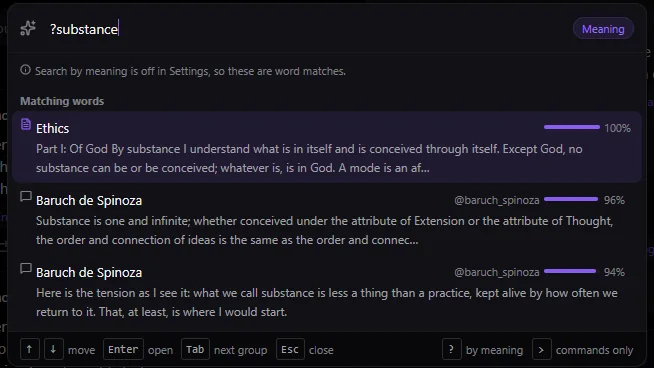
The palette still answers, with word matches under Matching words and a note saying why:
| Note | Cause |
|---|---|
| Search by meaning is off in Settings, so these are word matches. | Semantic search is off. |
| No embedding key is set, so these are word matches. | The provider needs a key that is missing. |
| Nothing is indexed by meaning yet, so these are word matches. | Nothing has been embedded with the current model yet. |
| A provider message, then Showing word matches instead. | Embedding the query failed. |
Word matches are scored relative to the best one, so their bars still compare sensibly.
Search by meaning elsewhere
Once the index exists, meaning also powers:
- the Search page, which merges posts found by meaning with posts found by words and marks the former by meaning;
- Find similar, for a post or a document;
- Close in meaning under a vault entry's related entries;
- recommendations: the recommended For you order, related thoughts and a profile's recommended posts;
- the map of meaning in Insights.
Indexing
Indexing runs in the background whenever there is something new:
- Every post with text and every vault document is embedded, across all your networks. Reposts without text of their own and locked posts are left out. Documents are embedded with their title.
- Long texts are cut into chunks (see Chunk size). Text that has not changed is never sent again; an edit re-embeds only what changed, and deleted items leave the index.
- Changing the model, provider or vector size re-embeds everything with the new settings. Vectors from different models are never compared.
- Chunks are sent 32 at a time. Each request counts against the daily budget in Settings › AI & Models (Daily request budget and Daily token cap; 0 means no limit).
- Vectors are stored in your local vault, so the index survives restarts.
The indexing pill
While indexing runs, a pill in the bottom-right corner reads "Indexing 120 of 800" over a thin progress bar.
- Click the pill to open Settings › Embeddings.
- Click its × (Stop indexing) to stop. A notice says Indexing stopped. Rebuild the index in Settings › Embeddings to resume.
- Rebuild the index confirms with "Rebuilding the index with gemini-embedding-001." and starts over.
When indexing stops
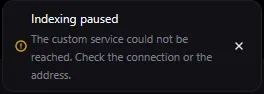
When the provider fails, indexing pauses, the pill reads Indexing paused with the reason, and a notice tells you once. The chunks wait and nothing is lost. Close the pill with its ×. Without a key that the provider needs, indexing does not start at all, and Rebuild the index answers with the missing-key notice.
| Reason (for the provider you chose) | What to do |
|---|---|
| "Gemini needs a key. Add one in Settings › AI & Models to search by meaning." | Add the key. |
| "Gemini rejected the embedding key. Check it in Settings › AI & Models." | Fix or replace the key. |
| "Gemini rate limit or quota reached. Try again later." | Wait, then rebuild. |
| "Today's AI budget is used up, so indexing paused. Raise it in Settings › AI & Models." | Raise the budget, or wait for the next day. |
| "Gemini could not be reached. Check the connection or the address." | Check the network or the server address. |
| "Gemini does not serve the model …" | Correct the model id. Gemma embedding runs on a local server; the Gemini API serves gemini-embedding-001. |
| "Gemini had a server error. Try again later." | Wait, then rebuild. |
| "Gemini sent a reply that could not be read." | Check the model and address of a custom service. |
Rate limits, unreachable servers and server errors are retried automatically first (Settings › AI & Models › Retries), waiting longer each time, up to a minute. A paused index resumes when you change the provider, model, address or key, or when you click Rebuild the index.
Tips and limits
- Results only come from the active network, though the index covers all networks.
- Except with a local server, the text of your posts and documents is sent to the provider to be embedded, and each query is sent too.
- Every vector is held in memory: about 30 MB for 10 000 chunks of 768 numbers, plus about half that again for the search graph.
- Short queries work, but a full question usually finds better passages than one word.