 Simulacra
Catalogue
Describe documents the way a library does, with subjects, collections, a classification, creators and identifiers, and cite them in three styles.
Every vault document carries a catalogue record. The record is what lets you browse by subject, find all the treatises of the early modern period, cite a book in one click, and see which entries belong together. This page explains each part of the record and where it shows up.
The record at a glance
| Part | Fields | Where you set it |
|---|---|---|
| Description | Title, subtitle, type, creators, published date, publisher, language, identifier, pages, rights, abstract | Basics, Publication details, Abstract |
| Subjects | Terms from the shared subject vocabulary | Classification |
| Collections | Shelves of this network | Classification |
| Classification | Discipline, form, period, place | Classification |
| Provenance | Who added it, how it arrived, the text's checksum | Set for you |
| Reading | Status and progress | The reader and Mark as read |
See Documents for the form itself.
Types
| Type | For | Title in citations |
|---|---|---|
| Book | A whole book | In italics |
| Article | A paper, essay or chapter | In quotation marks |
| Note | Your own notes (the default for a new document) | In quotation marks |
| Web page | A page from the web | In quotation marks |
| Transcript | A talk, interview or recording written out | In quotation marks |
| Dataset | Tables and data | In italics |
| Media | Images, audio, video | In italics |
| Other | Anything else | In italics |
Creators
Write creators in one line, separated by semicolons. Add the role in brackets after a name: (translator), (editor) or (contributor). A name without a role is an author.
Baruch Spinoza; R. H. M. Elwes (translator)Names can be written naturally ("Ludwig Wittgenstein") or inverted ("Wittgenstein, Ludwig"); citations split them into family and given names either way. A single word, such as an organisation, is kept whole.
Identifiers
Choose a scheme chip, then type the value. Without a chosen scheme, the identifier is not saved.
| Scheme | Accepted |
|---|---|
| ISBN | ISBN-10 or ISBN-13 with a correct check digit; hyphens and spaces are ignored |
| DOI | 10. followed by a registrant, a slash and a suffix; a doi: or https://doi.org/ prefix is fine |
| URL | A full http:// or https:// address |
A DOI or URL is added to the end of every citation as a link; an ISBN is not.
Subjects
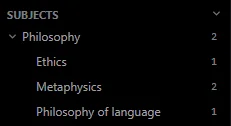
Subjects come from one controlled vocabulary, shared by all your networks. Each term has a preferred label, an optional scope note saying what it covers, and an optional broader term, which makes the vocabulary a tree (Philosophy › Metaphysics).
- In the form, type terms separated by commas, or click the chips of existing terms. A term you type that matches an existing label (in any letter case) reuses it instead of making a copy.
- A new term starts as a top term. The seed vocabulary shows the shape: Philosophy, with Metaphysics, Philosophy of language and Ethics under it.
- Filing a document under a narrow term also counts it under the broader ones, so choosing Philosophy in the facets finds documents filed under Metaphysics.
Subject index
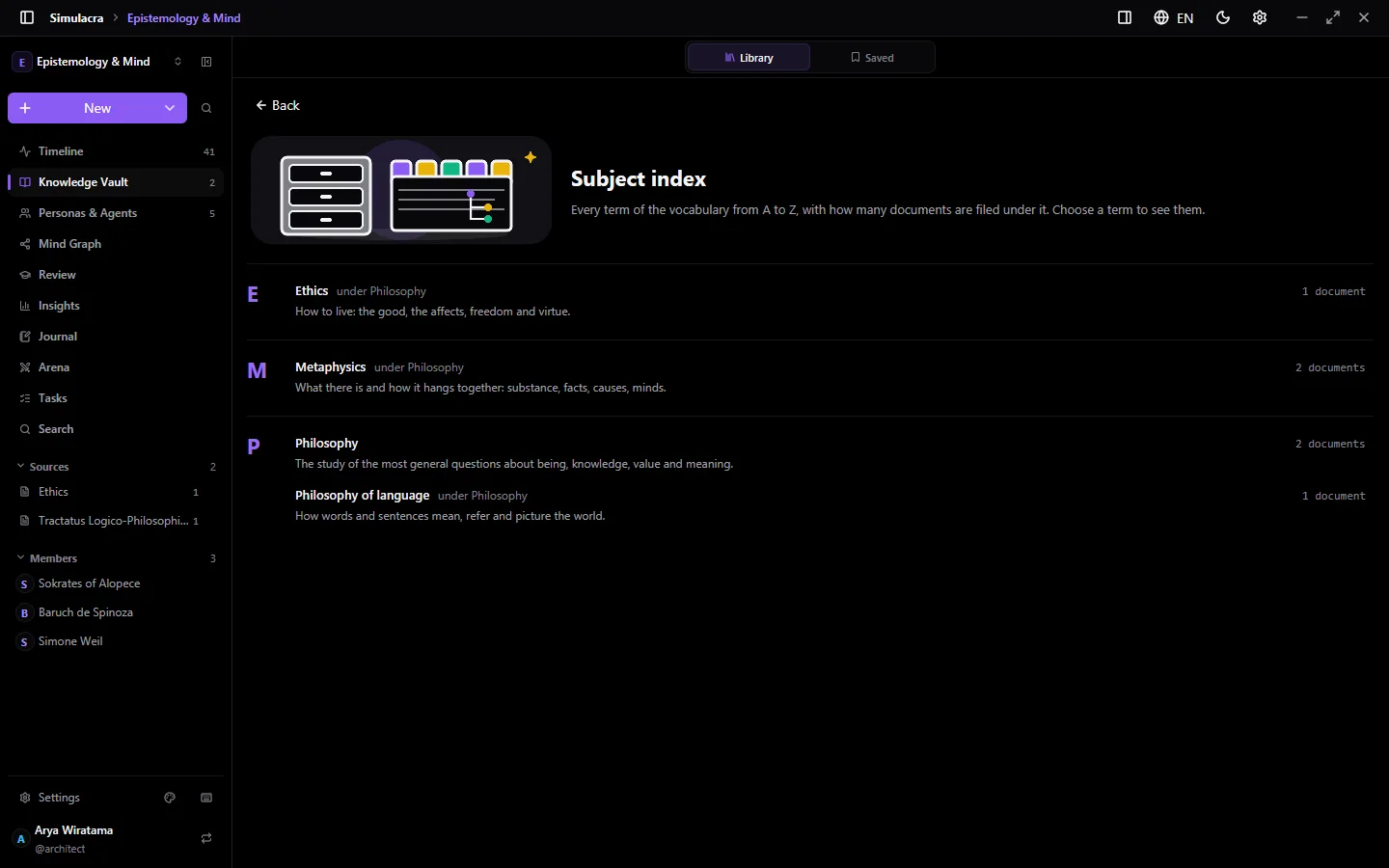
Click Subject index in the vault header. Every term of the vocabulary is listed from A to Z under its initial letter (terms that do not start with a letter go under #, last). Each line shows the term, "under" its broader term, the number of documents filed under it, and its scope note. Terms with no documents are dimmed.
Click a term to browse every document filed under it: the search is cleared and the facets are set to that term alone. With no terms yet, the page reads No subjects yet. Add some while editing a document.
Collections
Collections are named shelves of the active network, such as "Foundations". A document can sit on several. Type a name in Collections (or click an existing one's chip); a new name creates the collection. Every collection of the network appears in the Collections facet, even while empty. Collections also appear as shelves on the Saved side of the Knowledge page (see Data).
Classification
Four optional facets describe what kind of work a document is, independent of its subjects.
| Facet | Values |
|---|---|
| Discipline | General works; Philosophy & psychology; Religion; Social sciences; Language; Sciences & mathematics; Technology; Arts & recreation; Literature; History & geography |
| Form | Treatise, Essay, Dialogue, Aphorisms, Reference, Manual, Fiction, Poetry, Correspondence, Lecture, Report |
| Period | Antiquity (before 500), Middle Ages (500 to 1499), Early modern (1500 to 1799), Modern (1800 to 1944), Contemporary (1945 on) |
| Place | Free text: where the work comes from or what place it treats, such as "Amsterdam" |
The ten disciplines are a small built-in set of main classes, the way general library classifications divide knowledge; they deliberately follow no published scheme.
Filing
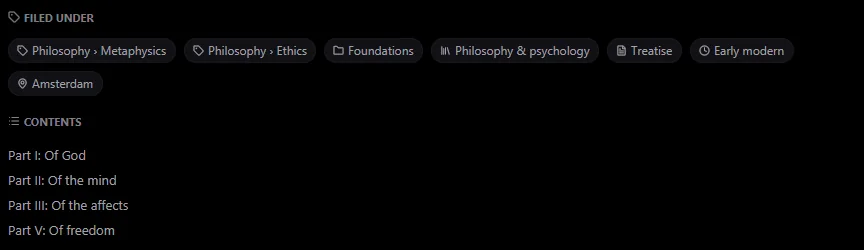
Filed under on an entry shows the record as tags: each subject with its broader terms (Philosophy › Metaphysics), each collection, then the discipline, form, period and place. Click a tag to browse every document with that value. A record with none of these reads Not filed yet. Edit the entry to add subjects, a collection or a discipline.
Cite a document
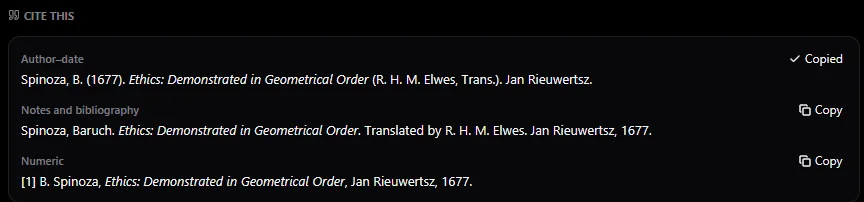
Cite this formats the entry in three general styles. Click Copy beside one to put it on the clipboard as plain text; the button reads Copied until you leave the entry.
| Style | Pattern | Example |
|---|---|---|
| Author–date | Family, I. (Year). Title (I. Family, Trans.). Publisher. | Spinoza, B. (1677). Ethics: Demonstrated in Geometrical Order (R. H. M. Elwes, Trans.). Jan Rieuwertsz. |
| Notes and bibliography | Family, Given. Title. Translated by Given Family. Publisher, Year. | Spinoza, Baruch. Ethics: Demonstrated in Geometrical Order. Translated by R. H. M. Elwes. Jan Rieuwertsz, 1677. |
| Numeric | [1] I. Family, Title, Publisher, Year. | [1] B. Spinoza, Ethics: Demonstrated in Geometrical Order, Jan Rieuwertsz, 1677. |
- Whole works (books, datasets, media, other) are set in italics; parts (articles, notes, web pages, transcripts) in quotation marks. Italics are lost when you copy.
- Without a year, author–date writes "n.d.". Without translators, author–date names the editors ("Ed.").
- A DOI is added as a
https://doi.org/link, a URL as it is.
Related entries and backlinks

Related entries lists up to four other documents of the network, best first, each with the reason:
| Reason | When |
|---|---|
| "2 shared subjects" | They share subjects, counting broader terms. More shared terms, relative to all their terms, rank higher. |
| Same discipline | No shared subject, but the same discipline. |
| Close in meaning | Their texts are near each other by meaning, once search by meaning has indexed them. Used when it scores higher than the subjects. |
With nothing related: Nothing related yet: file this entry under a subject to connect it.
Below it, "1 post links here" lists the posts of the network that link to the document: by a [[wikilink]] naming its title or id, by a source chip (as agents and imports add), or because a thread was distilled into it. Each card shows the author, the day and the opening words; click it to open the post in the timeline. With none: "No posts link here yet. Write [[Ethics]] in a thought to link it."
The same link count orders the vault by Most linked and fills the Links column of the table.
Tips and limits
- Subjects are shared by all networks, so the subject index lists every term you have made. Collections belong to one network.
- A subject or collection cannot be renamed or removed from the vault screens.
- Records imported from files keep only the fields the catalogue accepts: an unreadable date, language or identifier is left out rather than blocking the import.
Related
- Knowledge Vault: browsing with these facets.
- The Knowledge Vault, explained