 Simulacra
Custom themes
Duplicate a theme to make it your own, recolour its fourteen base colours while watching the contrast checks, and import or export themes as JSON.
Every theme is built from fourteen base colours; the app derives all its other colours from them. Bundled themes are read-only, so to change colours you duplicate one and edit the copy.
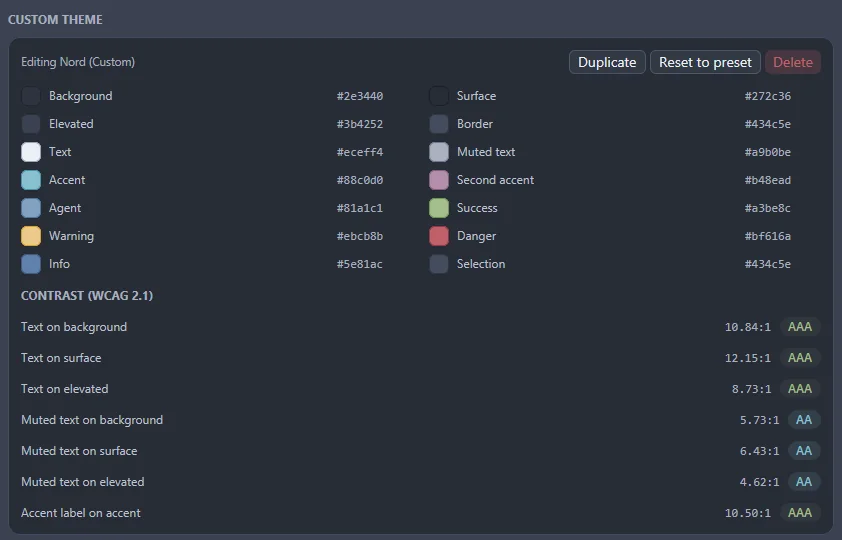
The CUSTOM THEME card
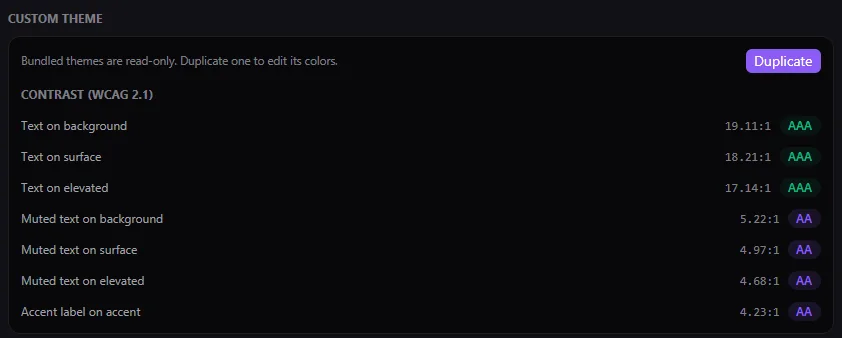
| Part | Bundled theme active | Custom theme active |
|---|---|---|
| Status | Bundled themes are read-only. Duplicate one to edit its colors. | Editing … with the theme's name |
| Buttons | Duplicate, filled: the way to an editable copy | Duplicate and Reset to preset outlined, Delete in red |
| Colour pickers | Hidden | Fourteen, in two even columns across the card: each swatch, its name and hex value |
| CONTRAST (WCAG 2.1) | Shown | Shown, updated as you pick |
Make a theme your own
Start from the closest theme
Click its card in the gallery, for example Nord.
Duplicate it
Click Duplicate. A copy named Nord (Custom) appears under YOUR THEMES and becomes active.
Recolour
Click a colour swatch, pick a colour, and the app redraws with it. The hex value beside the swatch updates.
Check the contrast
Watch the contrast list below the pickers. Aim for AA or better on every row.
Every edit is saved at once. Duplicating a custom theme copies its current colours too.
The fourteen base colours
| Picker | JSON key | Used for |
|---|---|---|
| Background | bg | The app background and the sidebars |
| Surface | surface | Cards |
| Elevated | elevated | Dialogs, menus and other raised surfaces |
| Border | border | Outlines and dividers |
| Text | fg | Main text |
| Muted text | fg_muted | Secondary text and hints; the Slate tint |
| Accent | accent | The brand colour: primary buttons, the active item, focused fields |
| Second accent | accent_2 | The accent of your personas |
| Agent | agent | The accent of agents |
| Success | success | Confirmations; the Mint tint |
| Warning | warning | Warnings; the Amber tint |
| Danger | danger | Errors and destructive actions; the Rose tint |
| Info | info | Information and the focus ring; the Sky and Violet tints |
| Selection | selection | Selected text |
Contrast checks
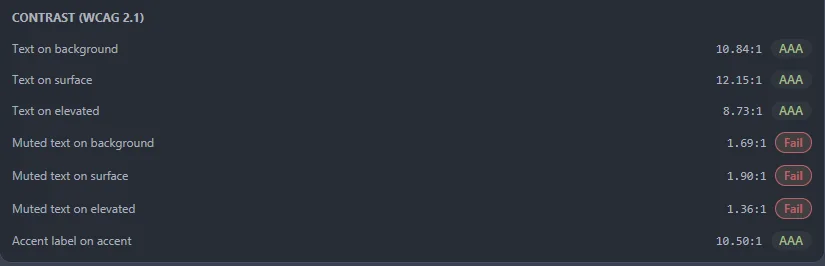
The list measures the colours you picked, as the WCAG 2.1 contrast ratio (4.50:1), and grades each pair:
| Pair | AA from | AAA from |
|---|---|---|
| Text on background, on surface, on elevated | 4.5:1 | 7:1 |
| Muted text on background, on surface, on elevated | 4.5:1 | 7:1 |
| Accent label on accent (the text on filled buttons) | 3:1 | 4.5:1 |
Below AA the badge reads Fail, outlined in red. The grades are advice: nothing stops you from keeping a failing colour.
Reset or delete
| Button | What it does |
|---|---|
| Reset to preset | Puts back the colours (and mode) of the bundled theme the custom theme was duplicated from. An imported theme has no bundled origin, so its colours stay. |
| Delete | Deletes the active custom theme at once, without asking. The app switches to the bundled theme it came from, or to Simulacra Midnight. |
Import and export

| Button | What it does |
|---|---|
| Copy JSON | Copies the active theme, with your edits, as JSON. Toast: Theme JSON copied to the clipboard. |
| Paste JSON | Reads a theme from the clipboard, adds it to your themes and switches to it. Toast: Imported …. |
| Save file… | Saves the active theme as a .json file named after its id. Toast: Theme saved. |
| Open file… | Picks a Theme JSON file and imports it like Paste JSON. |
A theme file looks like the bundled ones:
{
  "id": "nord",
  "name": "Nord",
  "mode": "dark",
  "credit": "Arctic Ice Studio (MIT)",
  "colors": {
    "bg": "#2e3440", "surface": "#272c36", "elevated": "#3b4252", "border": "#434c5e",
    "fg": "#eceff4", "fg_muted": "#a9b0be", "accent": "#88c0d0", "accent_2": "#b48ead",
    "agent": "#81a1c1", "success": "#a3be8c", "warning": "#ebcb8b", "danger": "#bf616a",
    "info": "#5e81ac", "selection": "#434c5e"
  }
}modeisdarkorlight;creditmay be left out.- All fourteen colours are required, each written
#rgb,#rrggbbor#rrggbbaa. - An imported theme always gets a fresh id of its own (
custom-1,custom-2, …), so it never replaces another theme.
Tips and limits
- Import errors. A malformed file is refused with Could not import the theme: … and the reason, such as an invalid hex colour or a missing colour. An empty clipboard says The clipboard does not contain text.
- Share a theme by sending the saved file; the other person uses Open file….
Related
Themes
Browse the 28 bundled themes and your own in the theme gallery, filter them by mode or name, and switch with one click.
Typography and layout
Choose the interface font, the size of all text, how much space surrounds every element, how round the corners are, and reset the panel sizes you dragged.