 Simulacra
Icon sets
Download icon sets to use as custom symbols on your posts, remove them again, and see who made each one on the Licences screen.
Beyond its built-in symbols, Simulacra can use thousands of icons as custom symbols on your posts. They come in 31 sets that are not bundled: you download the ones you want from Settings › Symbols.
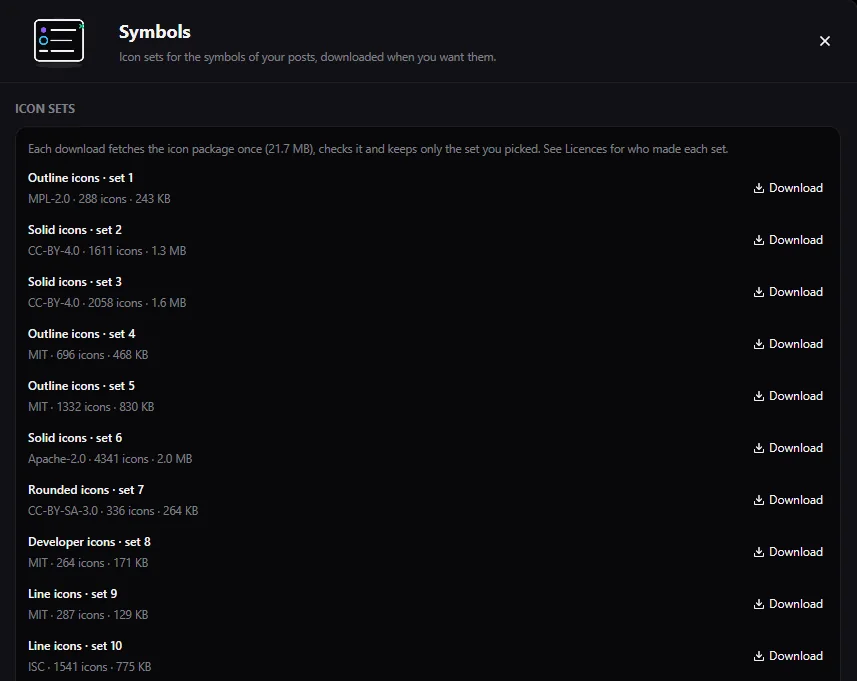
Settings › Symbols
The card opens with Each download fetches the icon package once (21.7 MB), checks it and keeps only the set you picked. See Licences for who made each set.
Each row shows:
- The set's label: its style and number, such as Line icons · set 9. The styles are Line icons, Outline icons, Solid icons, Rounded icons, Colour icons, Logos, Developer icons, Games & fantasy and Weather.
- Details: its licence, icon count and size (
MIT · 287 icons · 129 KB). For an installed set, the size is what it takes on disk. - The action: Download, or Remove once installed.
Download a set
Open Symbols
Press Ctrl,/⌘, and click Symbols in the rail.
Download
Click Download on a set. The button turns into a progress bar, a percentage and Cancel.
Use it
When it finishes, a toast says Icon set ready to use. Its icons can now be found by name in the composer's symbol picker.

- One at a time. While a set downloads, the other Download buttons are disabled. Cancel stops it (Download cancelled).
- Checked. The package is checked against its published checksum. If it does not match, it is thrown away and nothing is installed: The icon set could not be downloaded: the download did not match its checksum, so it was thrown away.
- Removing a set deletes its files (Icon set removed).
The sets
| # | Label | Icons | Licence | Size |
|---|---|---|---|---|
| 1 | Outline icons · set 1 | 288 | MPL-2.0 | 243 KB |
| 2 | Solid icons · set 2 | 1,611 | CC-BY-4.0 | 1.3 MB |
| 3 | Solid icons · set 3 | 2,058 | CC-BY-4.0 | 1.6 MB |
| 4 | Outline icons · set 4 | 696 | MIT | 468 KB |
| 5 | Outline icons · set 5 | 1,332 | MIT | 830 KB |
| 6 | Solid icons · set 6 | 4,341 | Apache-2.0 | 2.0 MB |
| 7 | Rounded icons · set 7 | 336 | CC-BY-SA-3.0 | 264 KB |
| 8 | Developer icons · set 8 | 264 | MIT | 171 KB |
| 9 | Line icons · set 9 | 287 | MIT | 129 KB |
| 10 | Line icons · set 10 | 1,541 | ISC | 775 KB |
| 11 | Games & fantasy · set 11 | 4,040 | CC-BY-3.0 | 6.6 MB |
| 12 | Weather · set 12 | 219 | OFL-1.1 | 405 KB |
| 13 | Logos · set 13 | 192 | MIT | 523 KB |
| 14 | Outline icons · set 14 | 831 | MIT | 717 KB |
| 15 | Solid icons · set 15 | 2,754 | MIT | 1.6 MB |
| 16 | Line icons · set 16 | 3,229 | Apache-2.0 | 2.1 MB |
| 17 | Colour icons · set 17 | 329 | MIT | 311 KB |
| 18 | Line icons · set 18 | 637 | Apache-2.0 | 494 KB |
| 19 | Outline icons · set 19 | 460 | MIT | 197 KB |
| 20 | Outline icons · set 20 | 972 | MIT | 598 KB |
| 21 | Logos · set 21 | 3,446 | CC0-1.0 | 5.0 MB |
| 22 | Line icons · set 22 | 189 | MIT | 208 KB |
| 23 | Solid icons · set 23 | 491 | CC-BY-4.0 | 337 KB |
| 24 | Solid icons · set 24 | 1,634 | MIT | 821 KB |
| 25 | Line icons · set 25 | 704 | MIT | 488 KB |
| 26 | Developer icons · set 26 | 612 | CC-BY-4.0 | 749 KB |
| 27 | Line icons · set 27 | 6,146 | MIT | 3.4 MB |
| 28 | Line icons · set 28 | 352 | MIT | 233 KB |
| 29 | Line icons · set 29 | 332 | MIT | 423 KB |
| 30 | Line icons · set 30 | 9,072 | MIT | 5.4 MB |
| 31 | Line icons · set 31 | 1,544 | MIT | 2.1 MB |
Settings › Licences
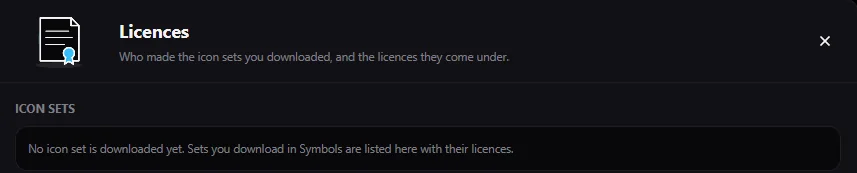
Licences is the only place that names the projects behind the sets. It says These icon sets were downloaded from the npm registry. Their makers and licences: and lists each set you downloaded with its project and licence, the project's site, and the licence text stored with the set. Sets you have not downloaded are not listed. With none, the card says only No icon set is downloaded yet. Sets you download in Symbols are listed here with their licences.
Tips and limits
- Where they go. Downloaded sets are stored in a
symbolsfolder beside your database, each with its licence file. See Data and files. - Only when you ask. The icon package is fetched from the npm registry only when you click Download, never in the background. See Local-first.
- Not in backups. A backup or snapshot copies the database, not the
symbolsfolder; download the sets again on a new computer, or copy the folder.
Related
Typography and layout
Choose the interface font, the size of all text, how much space surrounds every element, how round the corners are, and reset the panel sizes you dragged.
The Settings window
How the Settings window is laid out, how every kind of setting row works, how changes are saved, and how to search, reset and navigate it.