 Simulacra
Typography and layout
Choose the interface font, the size of all text, how much space surrounds every element, how round the corners are, and reset the panel sizes you dragged.
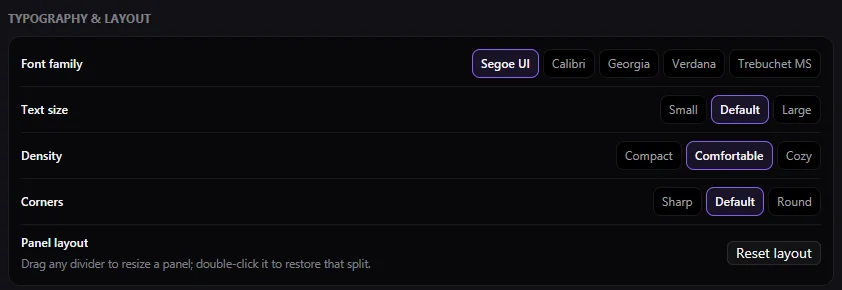
TYPOGRAPHY & LAYOUT in Settings › Appearance scales the whole interface. Each choice is a row like the other settings rows, its name on the left and its chips on the right, and applies at once, on top of whichever theme is active.
Options
| Row | Options | Default | What it changes |
|---|---|---|---|
| Font family | Segoe UI, Calibri, Georgia, Verdana, Trebuchet MS | Segoe UI | The font of the interface, headings and post text. Code keeps its monospace font. |
| Text size | Small, Default, Large | Default | The size of all interface text: Small is 92%, Large 110% of Default. |
| Density | Compact, Comfortable, Cozy | Comfortable | How much space surrounds every element: Compact is 75%, Cozy 125% of Comfortable. |
| Corners | Sharp, Default, Round | Default | How rounded corners are: Sharp is 35%, Round 160% of Default. Pills stay fully round. |
The five font families are those installed with Windows.
Density and Font size can also be found by searching Settings (compact, zoom): the results show the current value with Show in Appearance, and their reset arrow puts the default back.
Panel layout
The last row of the card is Panel layout: Drag any divider to resize a panel; double-click it to restore that split.
Every resizable split in the app, such as the Settings rail, remembers the size you drag it to. Reset layout puts every split back to its default size and forgets the saved sizes.
Make the text larger
Open Appearance
Click the palette icon in the sidebar footer.
Pick Large
In TYPOGRAPHY & LAYOUT, click Large beside Text size.
Give it room (optional)
Click Cozy beside Density for more space around each element.
Tips and limits
- These choices belong to the theme settings, not the preferences: Reset all settings leaves them as they are. Reset them one by one, or with the arrows in Settings search.
- Reading width and reduced motion are in READING COMFORT.