 Simulacra
Mood and energy
Check in on the affect grid with your energy, sleep and a note, then see your patterns and how they go along with what you do.
A check-in takes a few seconds: click where you are on the affect grid, set your energy, save. After a week or so, the Mood tab shows patterns by day, weekday and hour, and careful associations with what you already do in the app.
Open it
Click the Mood tab on the Journal, or run Log mood and energy in the command palette. The same check-in card is on the Today tab.
Check in
Click the grid
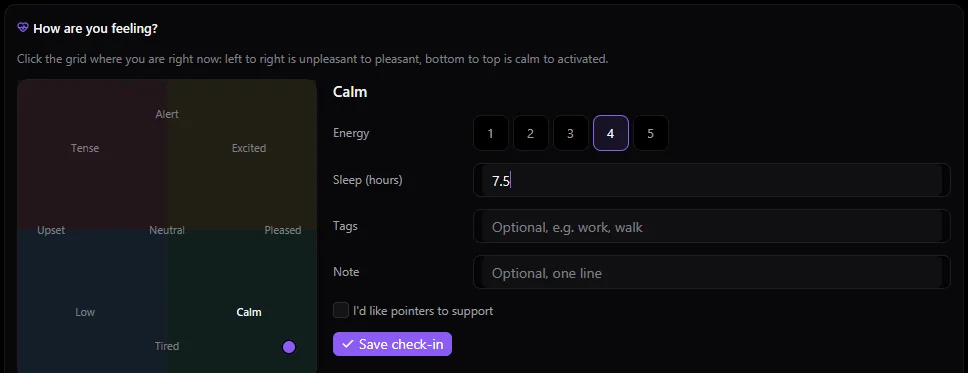
"Click the grid where you are right now: left to right is unpleasant to pleasant, bottom to top is calm to activated." Beside the grid, a label names the region of your point; before you click it reads Pick a point on the grid.
Set your energy
Under Energy, click a level from 1 (drained) to 5 (energised). It starts at 3.
Add details (optional)
Sleep (hours), for example 7.5; Tags, for example work, walk (commas or spaces, # dropped, lowercased); a one-line Note.
Save
Click Save check-in. It is disabled until you pick a point. The form clears for next time.
The grid reads your point as one of eight regions around the circle, or Neutral near the centre:
| Region | Where |
|---|---|
| Pleased | pleasant |
| Excited | pleasant and activated |
| Alert | activated |
| Tense | unpleasant and activated |
| Upset | unpleasant |
| Low | unpleasant and calm |
| Tired | calm |
| Calm | pleasant and calm |
Pointers to support

Tick I'd like pointers to support to see a short note on where to find help: a friend, family, your doctor, a counsellor or therapist, and your local emergency number or a crisis line if you might be in danger. It appears only because you ask; Simulacra never infers it from your mood. The app cannot give medical advice.
Your patterns
Once you have a check-in, the tab adds:
| Card | Shows |
|---|---|
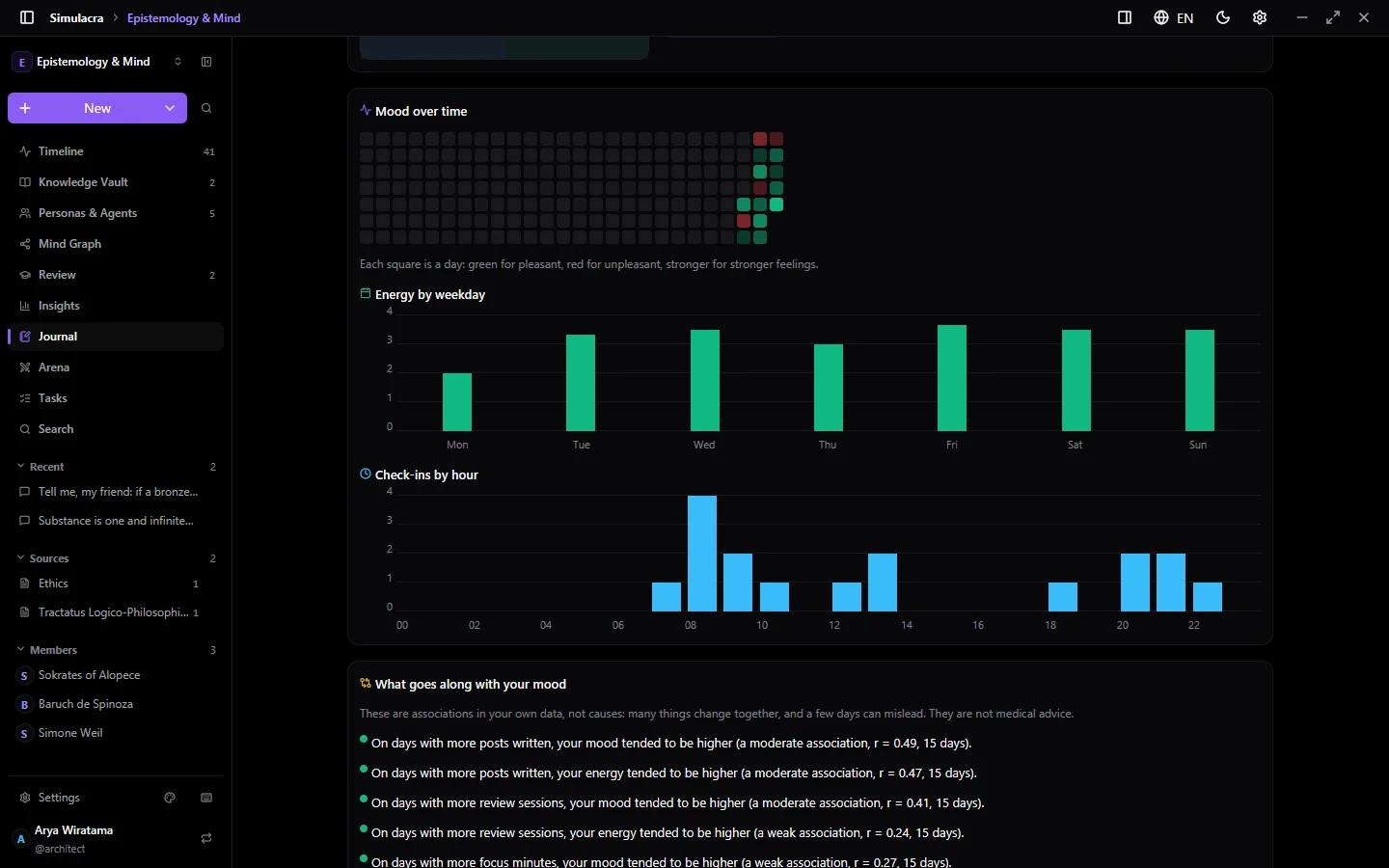
| Mood over time | A heat strip of each day's mean mood: green for pleasant, red for unpleasant, stronger for stronger feelings. 12 weeks in a compact window, 26 in wider ones. Hover for "day: mood +0.42, energy 3.5 (2 check-ins)". |
| Energy by weekday | Mean energy for each weekday, Monday first. |
| Check-ins by hour | How many check-ins at each hour of the day, with their mean energy. |
| What goes along with your mood | Associations with your activity (below). |
| Recent check-ins | The latest twelve: region, time, "energy N/5", "slept N h", tags and note (and the support note if you asked for it), each with Delete. |
Deleting a check-in asks first: "The check-in is removed for good, and your mood charts stop counting it."
With no check-ins the tab shows No check-ins yet: "Check in once or twice a day. After a week, patterns by day and hour start to show."
Associations
The associations card compares your daily mood and energy with three things the app already knows about your days: posts written, review sessions (answers more than 30 minutes apart start a new session) and focus minutes. Each line is one pair, for example:
On days with more focus minutes, your energy tended to be higher (a moderate association, r = 0.41, 12 days).
| Line | When |
|---|---|
| "not enough days yet (N of 7)" | Fewer than seven days with a check-in |
| "nothing varied enough to compare yet" | The activity or the mood was the same every day |
| "was about the same (no clear association…)" | The link is negligible |
| "tended to be higher / lower (a weak / a moderate / a strong association…)" | Cohen's bands of the correlation r |
"These are associations in your own data, not causes: many things change together, and a few days can mislead. They are not medical advice."
Feelings from your posts
When a persona of yours posts a feeling, it can also log a check-in here. Turn on Settings › Reading & Writing › Log my feelings in the journal (off by default). The check-in takes its point from the feeling's emojis and intensity, its energy from that point, and the feeling's note. Nothing from the journal goes back to the feed.