 Simulacra
Board
Every to-do and task post of a thread or profile, sorted into columns by the state it is in.
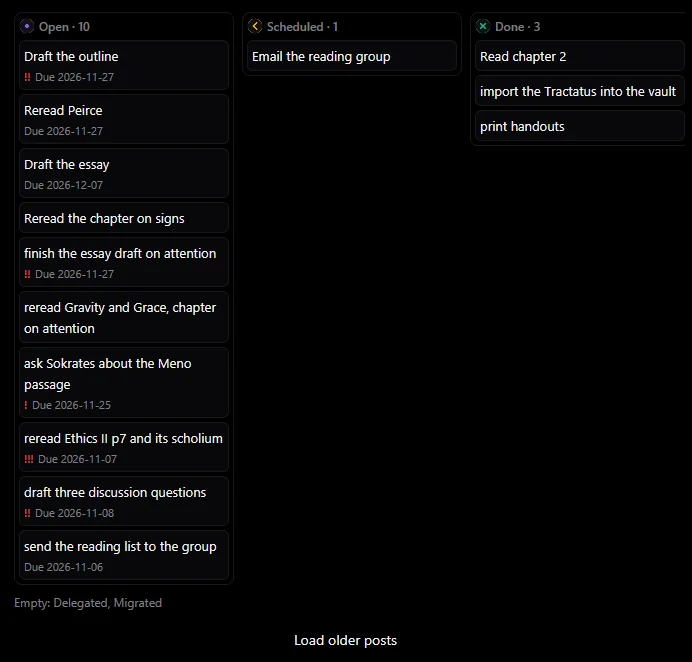
The board gathers the to-dos written inside posts, and task posts themselves, into one column per state: open, scheduled, delegated, migrated, done and dropped. It shows at a glance where a thread's work stands.
Open it
Pick Show as a board from a View menu (the Thread Inspector or a profile's Posts tab).
Anatomy
- Columns, always in this order: Open, Scheduled, Delegated, Migrated, Done, Dropped. Each heading has its state's symbol and a count, "Open · 3". Only columns with cards are drawn, sharing the width between them; the empty ones are named on one line under the board, such as "Empty: Delegated, Migrated, Dropped".
- Cards. One per to-do (a line such as
[ ] Draft the outline ^fri !!) and one per task post. A card shows the to-do's text, its priority as "!" marks (one to three), and "Due 2026-11-28" when it has a due date (dates follow the Date format setting). - Order. Within a column, cards follow the order of the posts, then the order of the to-dos inside each post.
The filled columns share the width of the view and scroll sideways only when even their narrowest width does not fit.
Click a card to open the post it belongs to. To move a to-do, tick it in its post; a task post moves with … › Organize › Entry. See Tasks.
Locked posts
A locked post brings no to-dos to the board: its text is sealed. A locked task post shows its card with "Locked post" only.
With nothing to sort the board says "No to-dos or tasks to sort yet."