 Simulacra
Claim views
Four views that track what you claim and ask: claims due for a check, changes of mind, open questions and the terms you defined.
Four views turn the honesty tools of the post menu into lists: which claims are due for a second look, where you changed your mind, which questions are still open, and which terms you have defined. Each is offered in the Thread Inspector and on a profile's Posts tab.
Still true?
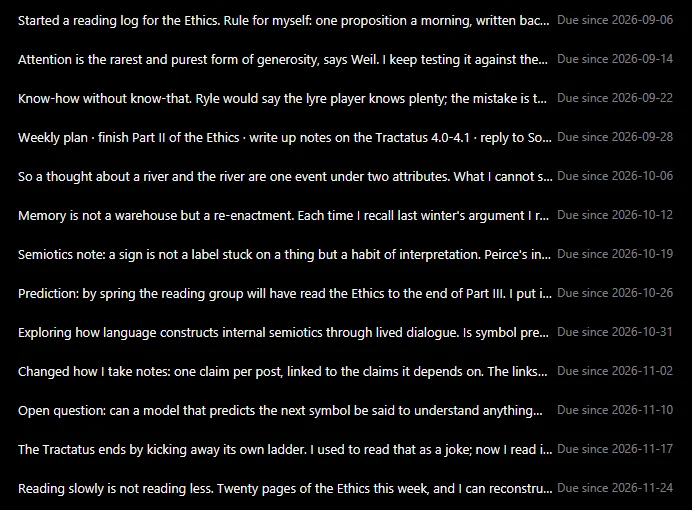
Pick Still true? from a View menu. Each row shows the claim on one line and "Due since 2026-10-30". Click one to open it, where its strip offers Still true, Revise, Retract and Ask the AI.
The view applies the due rule to every post it lists; the strip itself appears only on your own posts. Locked posts are never due, so never listed.
Empty: "Nothing to check: no claim here has waited long enough to be asked about again."
Changed my mind
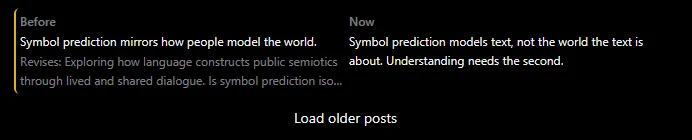
Pick Changed my mind from a View menu. Every change of mind among the posts in view, newest first:
- Before: what you used to think, then the revised post quoted in a quieter colour on at most two lines ("Revises: …").
- Now: the post that changed your mind, on one line.
Click a row to open the new post. Locked posts are never listed, nor shown as revised.
Empty: "No change of mind here yet."
Open questions

Pick Open questions from a View menu. Every open question among the posts in view, oldest first, each with "Asked 2026-11-02". Click one to open it. A locked one shows "Locked post".
For every open question of the network at once, run Open questions from the command palette.
Empty: "No question is open here."
Glossary

Pick Glossary from a View menu. Every term defined by the posts in view, alphabetically, each with its definition. Click a term to open the post that defines it. A locked post defines nothing, so it is never listed.
Empty: "No term is defined here yet."