 Simulacra
Calendar and future log
See the posts of a thread or profile on a month grid, or what lies ahead: scheduled posts and dated to-dos.
The calendar puts posts on the days they were written. The future log looks the other way: everything scheduled or due from today on, month by month.
Calendar
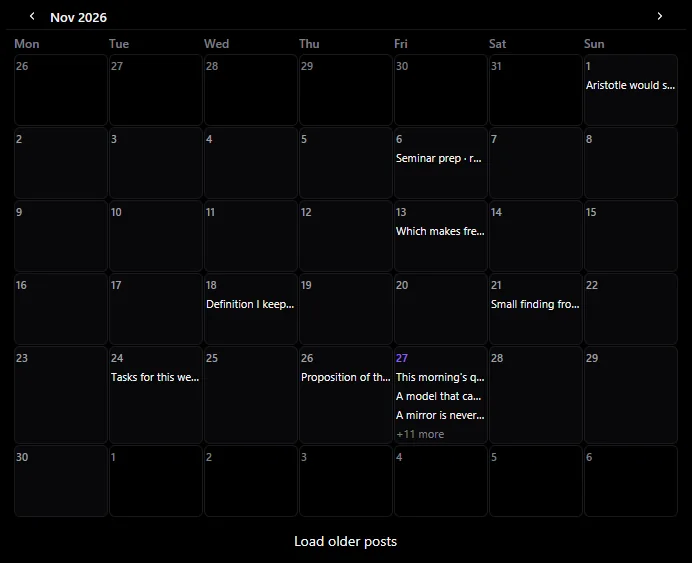
Pick Show as a calendar from a View menu.
- Header. The month and year ("Nov 2026") between Previous month and Next month. When you are not on the current month, This month brings you back.
- Weekdays. The grid starts on the day set in Settings › General › First day of the week.
- Days. Each cell shows its date and the opening words of up to three posts written that day, in the order written, then "+2 more". Today's date is in the accent colour. Days of the neighbouring months fill the first and last weeks, without their posts.
Click a post to open it. A locked post shows a lock instead of its words.
The calendar opens on the month of the newest post in view (or this month when there is none). The month you move to stays while you remain on that thread or profile.
Future log
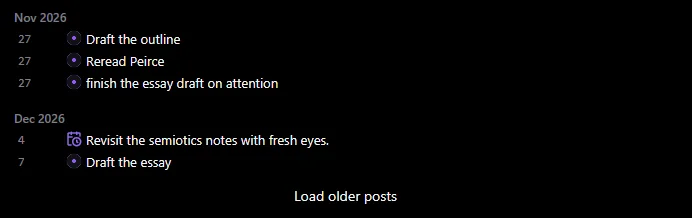
Pick Show the future log from a View menu.
The log lists, from today on:
- Scheduled posts, on the day they are due to go out, marked with a clock.
- To-dos with a due date written in the posts, on their due day, marked with their state's symbol. Done and dropped to-dos are left out.
Months read soonest first; within a month lines go by day, posts before to-dos on the same day. Each line shows the day of the month and the text.
Click a line to open its post. On a profile, clicking a scheduled post opens it for editing. The future log is the only view that shows posts still waiting to go out; schedule one from the composer with Schedule…. See the composer.
With nothing ahead it says "Nothing scheduled or due from today on."