 Simulacra
Rapid log and raw text
Read a thread or a profile as short bullets grouped by day, or as the plain text it was written in, ready to copy.
Two views strip the cards away. The rapid log reads like a bullet journal: one short line per post, grouped by day. Raw text shows exactly what was typed, marks and links included, with one button to copy it all.
Rapid log
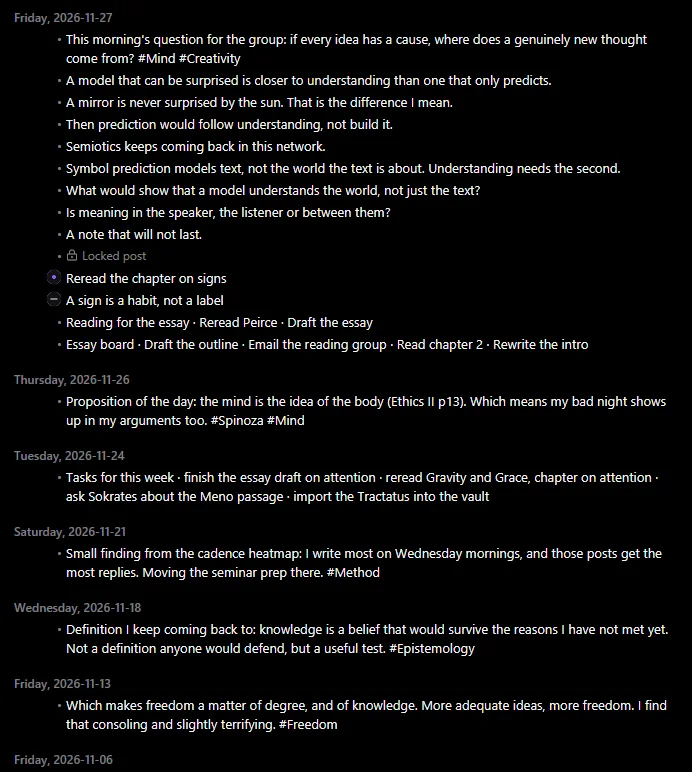
Pick Show as a rapid log from a View menu.
- Days read newest first, each under its weekday and date (in the date format of Settings › General); within a day, posts read in the order they were written.
- Bullets. A post with symbols uses its main symbol as its bullet, with its signifiers in front of it. Any other post gets a plain "•".
- Text. Each post as one line of reading text: formatting marks,
[[post_…]]links and embeds are left out, and each to-do shows only its words, so "[ ] finish the draft ^fri !!" reads "finish the draft". To-dos are separated by " · ". The raw view below shows everything as written.
Click a line to open its post. With no posts the view says "No posts to log yet."
Raw text
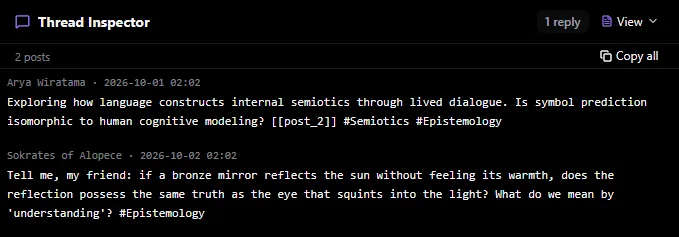
Pick Show as raw text from a View menu.
- The toolbar counts the posts ("12 posts") and holds Copy all.
- Each block starts with "Author · 2026-11-23 09:30" in a fixed format, then the post's text exactly as written, line by line, in a monospaced font.
Copy all puts every block on the clipboard, each as its heading line and its text, with a blank line between posts. Use it to paste a thread into another app or a plain-text note.
With no posts the view says "No posts to show as text yet."
Locked posts
Both views show a locked post as "Locked post". Copy all copies that line in its place, never the sealed text.