 Simulacra
Cards and outline
The Thread Inspector's default cards, and the outline that shows a whole thread as foldable text bullets you can walk with the keyboard.
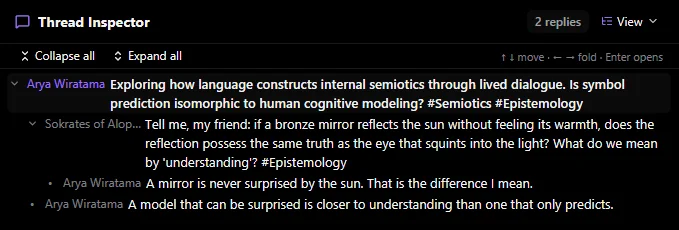
Cards is the default view: every post of the thread as a full card, with avatars, media, reactions and its … menu. When a thread grows long, the outline shows the same thread as nested, text-only bullets you can fold and walk with the arrow keys.
Switch between them
- Pick Show as cards or Show as outline from the Thread Inspector's View menu.
- Or run Toggle the outline view from the command palette (CtrlShiftP/⌘ShiftP). It swaps cards and outline; from any other view it returns to cards.
The outline is offered in the Thread Inspector only, not on profiles.
Read the outline
Each bullet is one post: a chevron (or a dot for a post without replies), the post's symbol when it has one, its author's name and its text. The bullet takes the post's tint. Replies sit under the post they answer, oldest first. The post you selected is in the accent colour.
A folded branch shows how many posts it hides, such as "+4".
The toolbar holds Collapse all, Expand all and a reminder of the keys: "↑ ↓ move · ← → fold · Enter opens".
The keyboard
Switching to the outline gives it the keyboard. The keys work only while the outline has focus.
| Key | Does |
|---|---|
| ↑ / ↓ | Move the cursor to the previous or next visible bullet |
| ← | Fold the branch, or move to its parent |
| → | Unfold the branch, or move to its first reply |
| Enter | Open the post under the cursor |
| Home / End | Jump to the first or last bullet |
With the mouse: click a chevron to fold or unfold, click a row to put the cursor there, double-click a row to open the post.
Opening a post selects it in the Thread Inspector and keeps the outline focused, so you can keep walking. Folded branches and the cursor are remembered per thread until you quit.
Cards
In Cards, the Thread Inspector shows the selected post in full with its thread around it, the depth dial and margin notes under it, and the rest of the conversation. See Threads for everything a card holds.