 Simulacra
Items
Every item you are learning in the network, with edit, suspend, resume and stop learning.
The Items tab lists everything you are learning in the active network, so you can fix a question, pause an item for a while, or stop learning it.
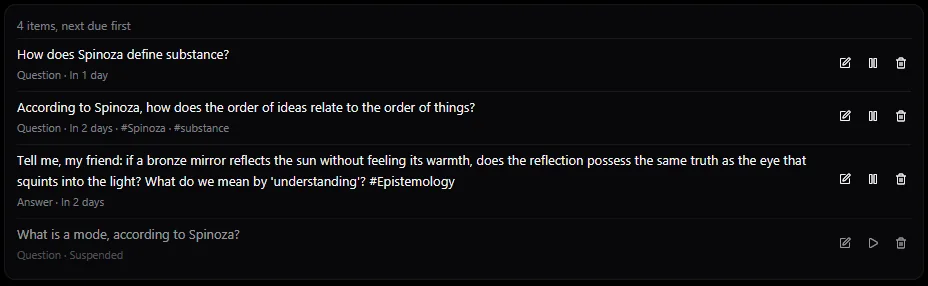
Open it
Click the Items tab on the Review page. The post picker and the map editor return here when you leave them.
Anatomy
The caption reads "N items, next due first". Each row shows:
- The headline: the item's prompt (two lines at most), or the map's title for a connection map.
- The meta line: kind (Question, Answer or Connections) · state · tags. The state is New, Due today, "N days overdue", "In N days", Suspended or Post deleted.
- The buttons, shown as icons with hover text:
| Button | What it does |
|---|---|
| Edit | Opens the learn sheet on the item, or the map editor for a map. The schedule is kept. |
| Suspend (leave out of reviews) | Takes the item out of sessions and quizzes until you resume it. |
| Resume reviews | Puts a suspended item back. |
| Stop learning | Asks Stop learning this? first, then removes the item. |
The order is: active items (learnt ones by due date, then new ones), then suspended items, then retired ones. Up to 400 rows are listed.
Stop learning an item
Click Stop learning
Click the bin icon on the item's row.
Confirm
The dialog explains: "It leaves your reviews. The post or passage stays, and its past answers stay in the statistics." Click Stop learning.
The post or passage itself is never touched. To learn it again, add a new question or answer; it starts as new.
Retired items
When you delete a post, its item is retired: it reads Post deleted, is dimmed, and never comes back in a review. It stays listed, and its past answers stay in the statistics; remove it with Stop learning if you like. Retired items have no edit or suspend button.