 Simulacra
The review session
Recall each item, reveal it, and grade how well you knew it with the keys 1 to 4.
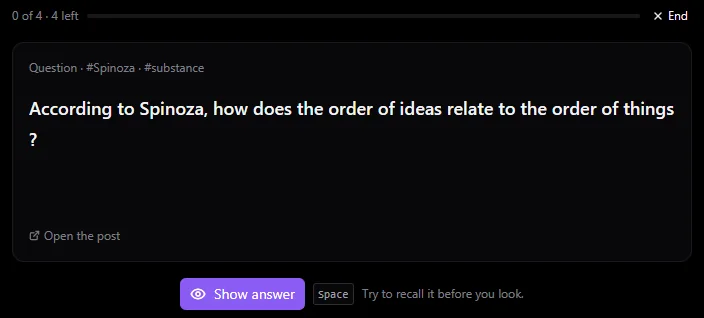
A session walks through today's queue one item at a time: you try to recall the hidden face, reveal it, and grade yourself. The grade decides when the item comes back.
Start a session
On the Today tab, click Start review (N). The session takes the keyboard at once, so you can work through it without the mouse.
The queue holds the due items (most overdue first) and a ration of new ones (oldest first), within the limits of Settings › Learning. New items are spread evenly between the reviews, and items from the same post or document are moved apart where possible, so similar items rarely follow each other.
Anatomy
- Progress reads "N of N · N left": distinct items done, items the session started with, and cards still in the queue (an item to relearn counts again here).
- End ends the session early and shows its summary (or returns to Today if you answered nothing).
- The item card. Its top line names the kind (Question, Answer or Connections) and its tags. Below it, the prompt face: your written text in large type, a post as the stream shows it, or a passage as a quote.
- Open the post / Open the document at the foot of the card jumps to the source.
- Show answer, with the hint "Try to recall it before you look."
A connection map item shows a drawing canvas instead; see Connection maps.
Reveal and grade
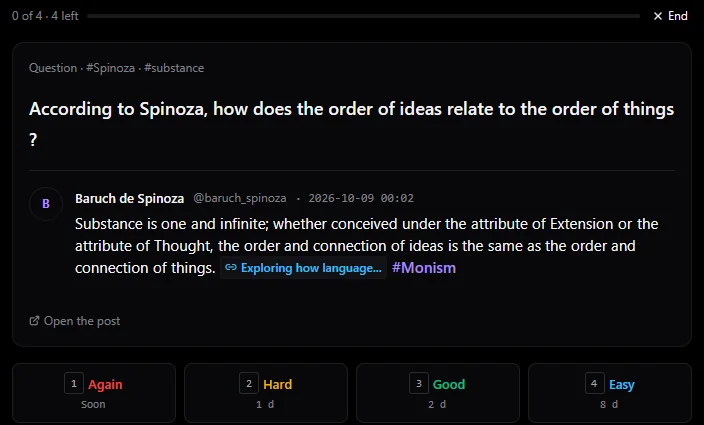
Recall
Say or think the answer before you look. A rough recall still counts; looking first does not.
Reveal
Press Space or Enter, or click Show answer.
Grade
Press 1 to 4 or click a grade button. The next item appears at once.

| Key | Grade | Hover text | What happens |
|---|---|---|---|
| 1 | Again | Forgotten. It comes back in this session. | The item returns three cards later, at most twice per session. |
| 2 | Hard | Recalled, but with real effort. | The shortest successful interval. |
| 3 | Good | Recalled after a moment's thought. | The interval for your target recall. |
| 4 | Easy | Recalled at once, without effort. | Always longer than Good. |
The small figure under each grade is the interval it gives: Soon (this session), "4 d", "2.5 mo" or "1.2 y". The intervals come from the item's memory model and your desired retention; Hard is never longer than Good, and Easy is always at least a day longer. See Spaced repetition.
Every grade is saved the moment you give it, so ending early or closing the app loses nothing.
Keys
The review keys are live only while an item waits for them, so digits typed into a text field are never taken as grades.
| Key | In a session | In a quiz |
|---|---|---|
| Space, Enter | Show the answer, or check a drawn map | Next question (multiple choice) |
| 1 2 3 4 | Again, Hard, Good, Easy | Pick option 1–4 (multiple choice), or grade a checked free-recall answer |
The same keys reveal and grade the stops of a memory palace walk.
The summary
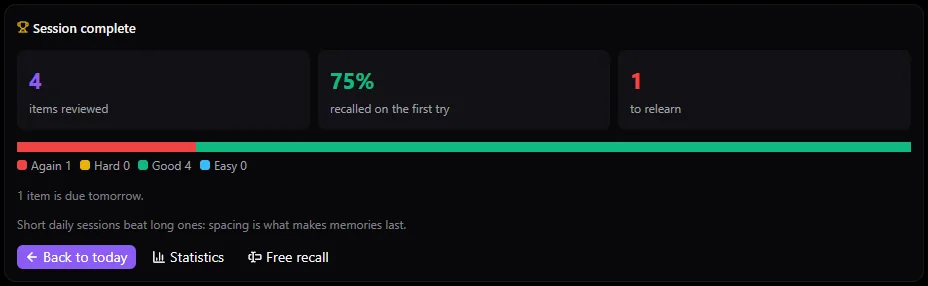
| Part | Shows |
|---|---|
| items reviewed | Distinct items answered |
| recalled on the first try | The share of first answers that were not Again |
| to relearn | Answers graded Again |
| The bar | Every answer split by grade, with a legend |
| The captions | How many items are due tomorrow, and the tip "Short daily sessions beat long ones: spacing is what makes memories last." |
The buttons go Back to today, to Statistics, or straight into a Free recall quiz.
Tips and limits
- An item deleted while the session runs is skipped.
- Switching networks ends the session.
- New items count against the daily limit for new items from the moment they are first answered.