 Simulacra
Socratic tutor
A dialogue that asks rather than explains, climbing Bloom's levels, then turns your gaps into review items.
The tutor asks rather than explains. It draws out what you think, probes definitions, asks for examples and counterexamples, puts your own statements side by side, and climbs from remembering to creating. At the end it sums up what you showed and what was missing, and offers review questions for the gaps.
The tutor needs an AI key (Settings › AI & Models). Each of its requests counts toward today's AI budget.
Open it
On the Review page, click the Learn tab, then Tutor in the sub-switch (Tutor, Goals, Gaps, Palace).
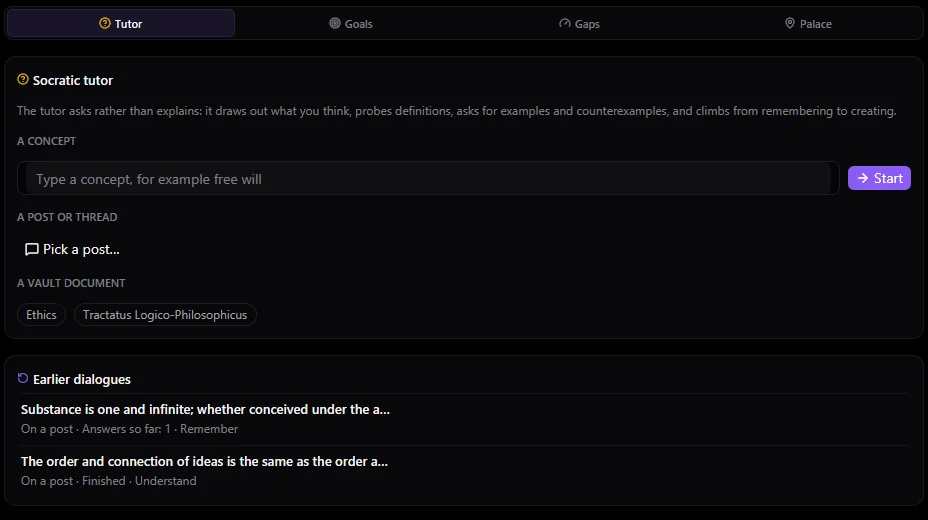
Start a dialogue
Choose what the tutor talks about:
| Under | Do this | The tutor reads |
|---|---|---|
| A concept | Type a concept ("for example free will") and press Enter or click Start | Your own posts on that concept |
| A post or thread | Click Pick a post…, then This post or Whole thread on a row | The post, or the thread from its first post |
| A vault document | Click one of the document chips (up to eight are offered) | The document |
What the tutor reads is cut to 4,000 characters and treated as quoted material, never as instructions. The opening question elicits your current view at the bottom rung of the ladder.
Ask the tutor on the gap radar starts a dialogue on that concept directly.
The dialogue
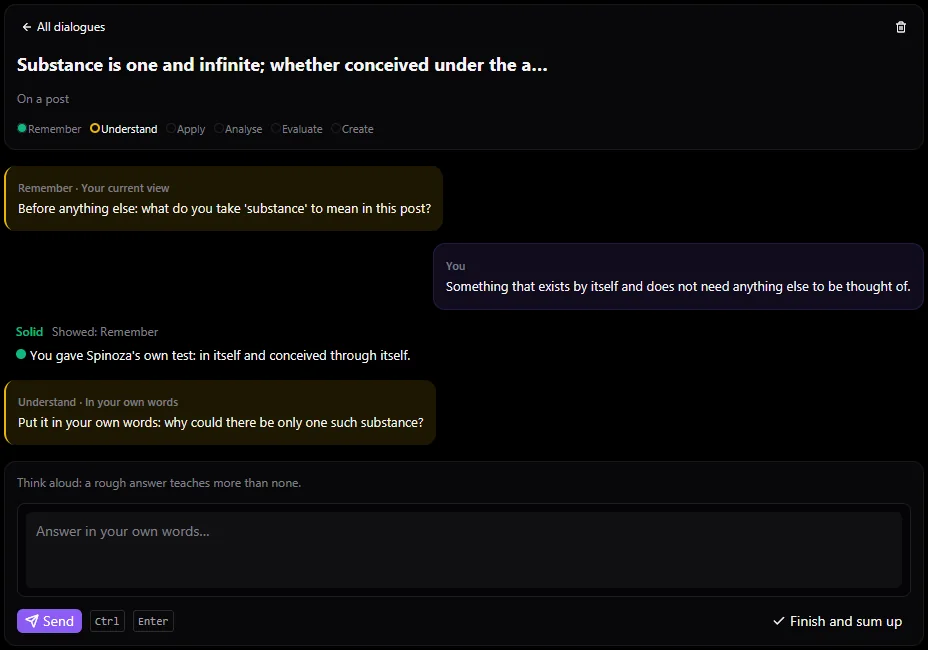
- The head: All dialogues to go back, the bin (Delete this dialogue), the title and what it is on (On a post, On a thread, On a passage, On a document or On a concept).
- The ladder: Bloom's six levels, Remember, Understand, Apply, Analyse, Evaluate, Create. Levels you have shown are filled; the level the open question aims at is ringed.
- Tutor bubbles: each question with its level and move (see below).
- Your bubbles: each answer under You, then its verdict, Solid, Partly there or Not yet, and "Showed: …" for the level it reached.
- The answer box: "Answer in your own words…", the tip "Think aloud: a rough answer teaches more than none.", Send (or CtrlEnter/⌘Enter), and Finish and sum up once you have answered at least once.
Only the two latest exchanges show; Show the earlier questions (N) opens the rest.
How the tutor moves
| After your answer | The tutor |
|---|---|
| Solid at the current level | Climbs one level |
| Partly there | Stays, and asks for an example (a definition at the bottom rung) |
| Not yet | Probes once at the same level; after two misses in a row it steps down a level and asks for an example |
| A misconception | Answers it with a counterexample, then, if it persists, puts your own statements side by side |
| Move | What the question does |
|---|---|
| Your current view | Draws out your model before anything else |
| Definition | Asks what a key term means, exactly |
| In your own words | Asks for the idea rephrased |
| Example / Counterexample | Asks for a case that fits, or one that breaks the claim |
| Tension | Puts two of your statements side by side |
| Application, Analysis, Judgement, Synthesis | Tests the higher levels |
The dialogue closes by itself after ten answers, or after a solid answer at Create.
While the tutor thinks
| State | Shows | You can |
|---|---|---|
| Waiting for a reply | The tutor is reading your answer… or The tutor is summing up… | Stop |
| A request failed | The reason, for example The tutor lectured instead of asking. | Try again |
| Left waiting (for example after a restart) | This dialogue is waiting for the tutor. | Continue |
The tutor's replies are checked so that it asks rather than lectures: a reply with no question (The tutor did not ask a question.), one too long to be a question, or one that cannot be read (The tutor's reply could not be read.) is not used.
The summary
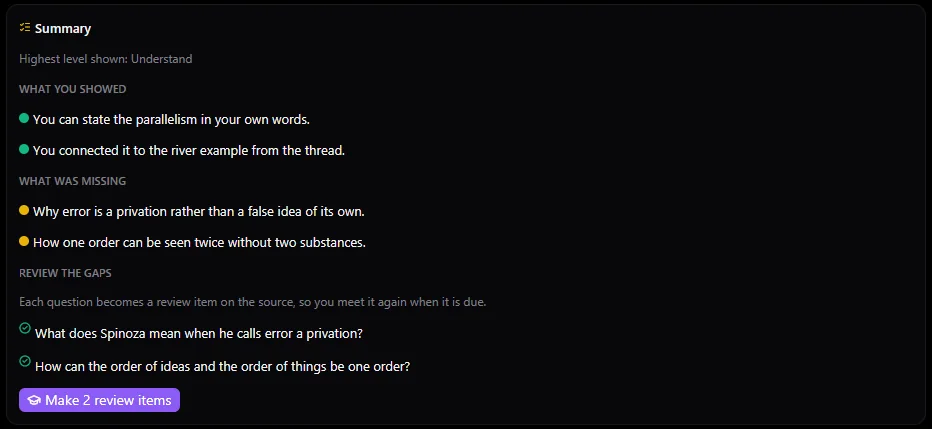
The summary card gives "Highest level shown: …", the lists What you showed and What was missing, and under Review the gaps one review question per gap, all ticked. Untick the ones you do not want and click Make N review items. Each becomes a review item anchored to the dialogue's source (the post, the thread's first post, or the passage or document), so you meet it again when it is due.
A typed concept has no source to anchor items to. The summary says so and offers Write a post: write about the concept, then learn that post.
Earlier dialogues
The Earlier dialogues list (up to twelve) shows each dialogue's title and a line such as "On a post · Answers so far: 4 · Understand", or Finished. Click one to resume it where it stopped.
Tips and limits
- An answer is kept up to 2,000 characters. Blank answers are ignored.
- Delete this dialogue removes it at once, without asking.
- Tutor dialogues count towards a goal's progress when they work on the goal's material.