 Simulacra
Code
Let the code blocks of posts run with the runtimes installed on this computer, set the time limit, and choose which runtimes may be used.
Code decides whether fenced code blocks in posts get a Run button. It is off until you switch it on, and every run is bounded.
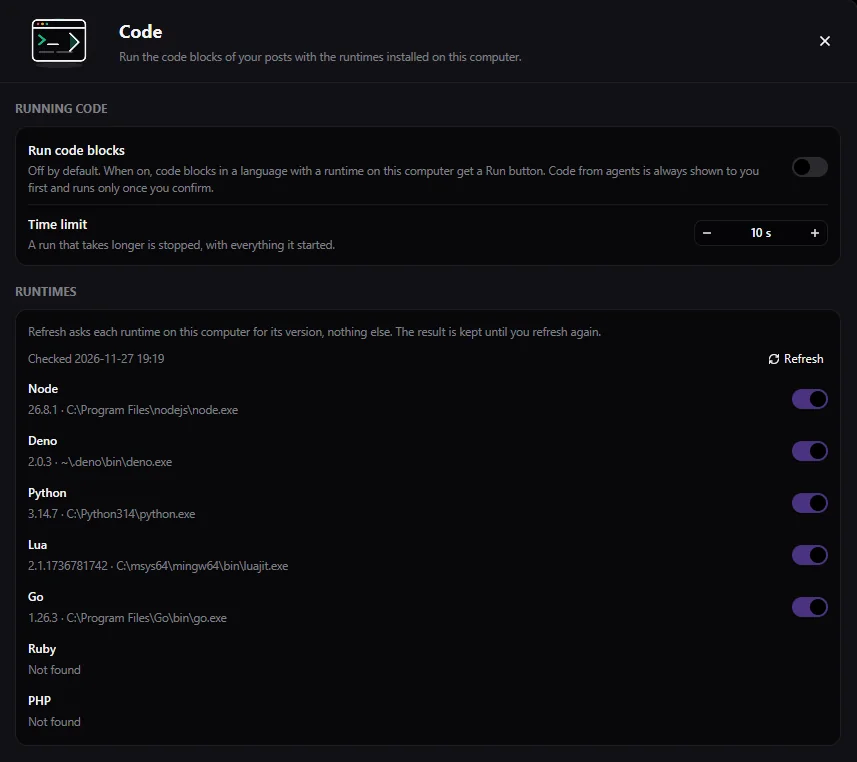
RUNNING CODE
| Setting | Control | Range | Default | What it does |
|---|---|---|---|---|
| Run code blocks | Switch | Off | When on, code blocks in a language with a runtime on this computer get a Run button. Code from agents is always shown to you first and runs only once you confirm. | |
| Time limit | Stepper | 1 to 300 s | 10 s | A run that takes longer is stopped, with everything it started. |
RUNTIMES
The card says Refresh asks each runtime on this computer for its version, nothing else. The result is kept until you refresh again. Nothing is checked until you press it.
| Part | What it is |
|---|---|
| Status line | Not checked yet. or Checked … with the time of the last check. |
| Refresh | Asks every runtime for its version (Checking… while it runs). |
| One row per runtime | Node, Deno, Python, Lua, Go, Ruby, PHP: the version and path found (3.12.1 · /usr/bin/python3; your home folder is written ~), or Not found. |
| Runtime switch | Lets that runtime run code. Every runtime is on by default; the switches are dimmed until Run code blocks is on. A runtime the last check did not find has no switch until a later check finds it. |
Switch code running on
Find your runtimes
In Settings › Code, click Refresh. Each installed runtime shows its version.
Switch running on
Turn on Run code blocks.
Narrow it down (optional)
Turn off the runtimes you never want used, and set the Time limit.
How a run is contained
- Only the runtime's own program starts, never a shell; shell languages have no runtime.
- Each run gets a fresh, private folder, deleted afterwards, and an environment cleared of your keys, tokens and proxy settings.
- A run stops at the time limit or when its output passes 64 KiB, together with every process it started.
- The runner is not a sandbox for files or the network: code runs with your rights, like code pasted into a terminal. That is why code you did not write asks for a confirm.
The full review is in the design decisions (P7).
Tips and limits
- Exports never carry these switches, so an imported bundle cannot turn code running on.
- A restored snapshot brings its own switches back, including the master switch, because it replaces the whole vault.