 Simulacra
Privacy & Data
See where your vault and media live, back up, export, seal or restore the vault, clear caches, and decide whether link previews are fetched and the journal is searchable.
Privacy & Data is where your vault is managed: its folders, its copies and what may leave the computer.
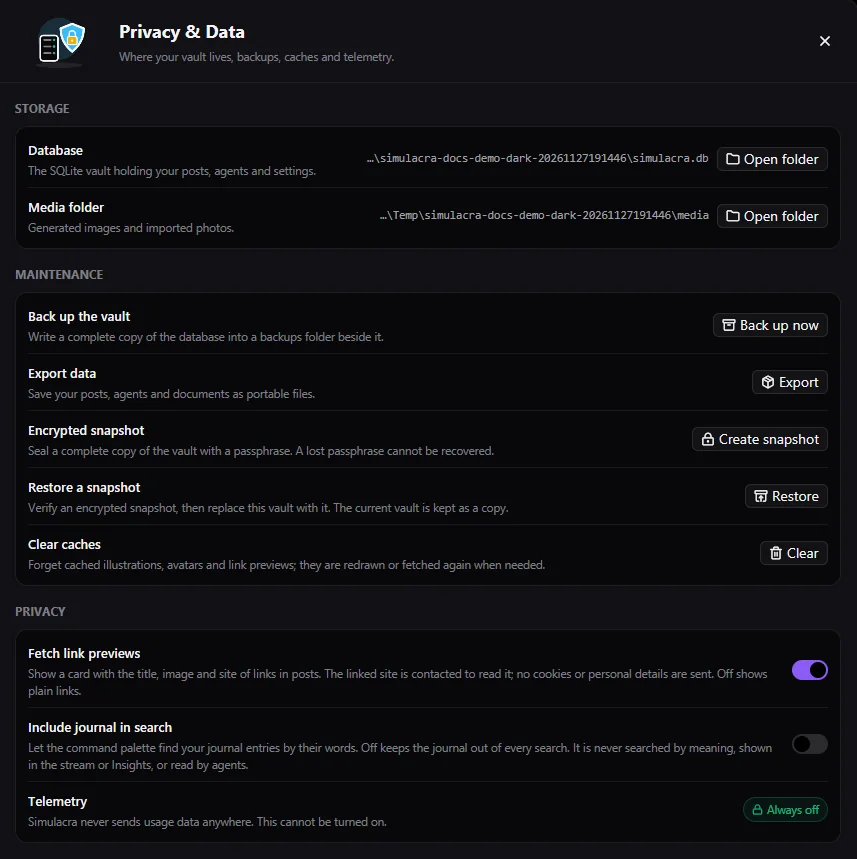
STORAGE
| Row | Shows | Button |
|---|---|---|
| Database | The path of the SQLite vault holding your posts, agents and settings. | Open folder opens its folder in your file manager. |
| Media folder | The folder of generated images, imported photos and other files posts show. | Open folder opens it, creating it first if it does not exist. |
Your home folder is written ~. A long path keeps its end, the folder and file that tell it apart, and starts with "…"; the tooltip of Open folder shows the whole path. Where each folder is on your system: Data and files.
MAINTENANCE
| Row | Button | What it does |
|---|---|---|
| Back up the vault | Back up now | Writes a complete copy of the database into a backups folder beside it, named by date and time (simulacra-20261117-210455.db). A toast says Backup saved in the backups folder: simulacra-….db. |
| Export data | Export | Opens the export dialog: your posts, agents and documents as a zip of portable files. See Export. |
| Encrypted snapshot | Create snapshot | Seals a complete copy of the vault with a passphrase. A lost passphrase cannot be recovered. See Encrypted snapshots. |
| Restore a snapshot | Restore | Verifies an encrypted snapshot, then replaces this vault with it; the current vault is kept as a copy. |
| Clear caches | Clear | Forgets cached illustrations, avatars and link previews; they are redrawn or fetched again when needed. A toast counts the images cleared. |
Export, snapshot and restore close Settings and open their own dialog.
PRIVACY
| Setting | Control | Default | What it does |
|---|---|---|---|
| Fetch link previews | Switch | On | Show a card with the title, image and site of links in posts. The linked site is contacted to read it; no cookies or personal details are sent. Off shows plain links and nothing is requested. |
| Include journal in search | Switch | Off | Let the command palette find your journal entries by their words. Off keeps the journal out of every search. It is never searched by meaning, shown in the stream or Insights, or read by agents. |
| Telemetry | Always off | Off | Simulacra never sends usage data anywhere. This cannot be turned on: the stored value is forced off every time it is read. |
Back up before a big change
Open Privacy & Data
Press Ctrl,/⌘, and click Privacy & Data.
Back up now
Click Back up now. The toast names the new file.
See it
Click Open folder on the Database row; the copy is in backups.
A backup is the database only
Back up now and encrypted snapshots copy the database file. The media folder, avatar photos and downloaded icon sets are separate files beside it; copy them yourself to keep them. See Storage and backups.