 Simulacra
Embeddings
Choose where posts and documents are turned into vectors for search by meaning, which model and vector size to use, how text is chunked, and rebuild or stop the index.
Embeddings configures search by meaning. Every post and vault document is cut into chunks, and each chunk is turned into a vector by an embedding model; searching by meaning compares those vectors. See Meaning search for the idea.
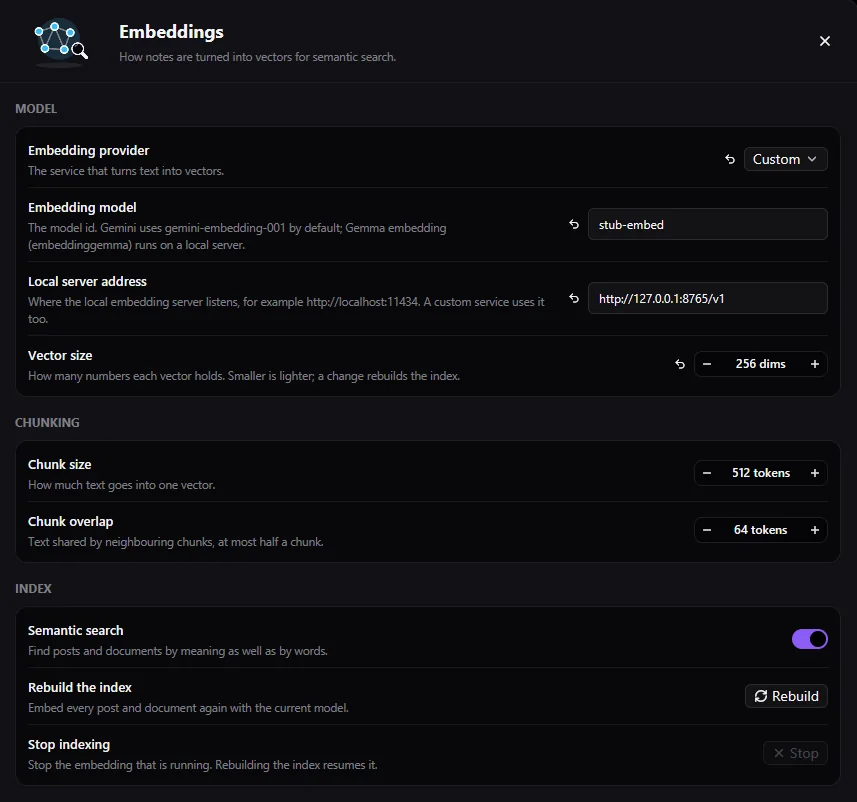
MODEL
| Setting | Control | Range or options | Default | What it does |
|---|---|---|---|---|
| Embedding provider | Menu | Gemini, Local server, OpenAI, Custom | Gemini | The service that turns text into vectors. |
| Embedding model | Text | gemini-embedding-001 | The model id. Blank means the provider's default. | |
| Local server address | Text | blank (http://localhost:11434) | Where a local embedding server listens. A custom service uses it too. Dimmed unless the provider is Local server or Custom. | |
| Vector size | Stepper (step 128) | 128 to 3072 dims | 768 dims | How many numbers each vector holds. Smaller is lighter; a change rebuilds the index. |
| Provider | Default model | Key | Address |
|---|---|---|---|
| Gemini | gemini-embedding-001 | A Google Gemini credential, or the provider pane's key when Gemini is the AI provider | The Gemini API |
| Local server | embeddinggemma (Google's Gemma embedding model) | None | Local server address |
| OpenAI | text-embedding-3-small | An OpenAI credential | https://api.openai.com/v1, or the credential's endpoint |
| Custom | text-embedding-3-small | A Custom Endpoint credential | Local server address |
Switching the provider moves a model still at the old provider's default to the new provider's default. A model id you typed yourself stays.
CHUNKING
| Setting | Control | Range | Default | What it does |
|---|---|---|---|---|
| Chunk size | Stepper (step 64) | 128 to 4096 tokens | 512 tokens | How much text goes into one vector. |
| Chunk overlap | Stepper (step 16) | 0 to 1024 tokens | 64 tokens | Text shared by neighbouring chunks. It is never more than half a chunk. |
INDEX
| Setting | Control | Default | What it does |
|---|---|---|---|
| Semantic search | Switch | On | Find posts and documents by meaning as well as by words. Off stops indexing and searching by meaning. |
| Rebuild the index | Rebuild | Embeds every post and document again with the current model. A toast says Rebuilding the index with …. | |
| Stop indexing | Stop | Stops the embedding that is running. Rebuild resumes it. The button is disabled while nothing is being indexed. |
Use a local embedding server
Start the server
Run a local embedding server that serves embeddinggemma and answers POST /api/embed, by default on http://localhost:11434.
Pick Local server
In Settings › Embeddings, set Embedding provider to Local server. The model changes to embeddinggemma and Local server address becomes editable.
Set the address if it differs
Type the server's address if it is not http://localhost:11434.
Rebuild
Click Rebuild. With the server on this computer, the text of your posts and documents no longer leaves it to be embedded.
Tips and limits
- Embedding requests count against the daily AI budget of Settings › AI & Models. When it is spent, indexing pauses with Today's AI budget is used up, so indexing paused.
- Request timeout and retries of Settings › AI & Models apply to embedding requests too.
- Errors such as a missing or rejected key, an unknown model or an unreachable server are listed in Troubleshooting.