 Simulacra
General
The interface language, regional formats, who you write as when the app starts, the screen it opens on, and the welcome tour.
General is the first category of Settings and the one Ctrl,/⌘, opens. It decides how the app speaks to you and how it starts.
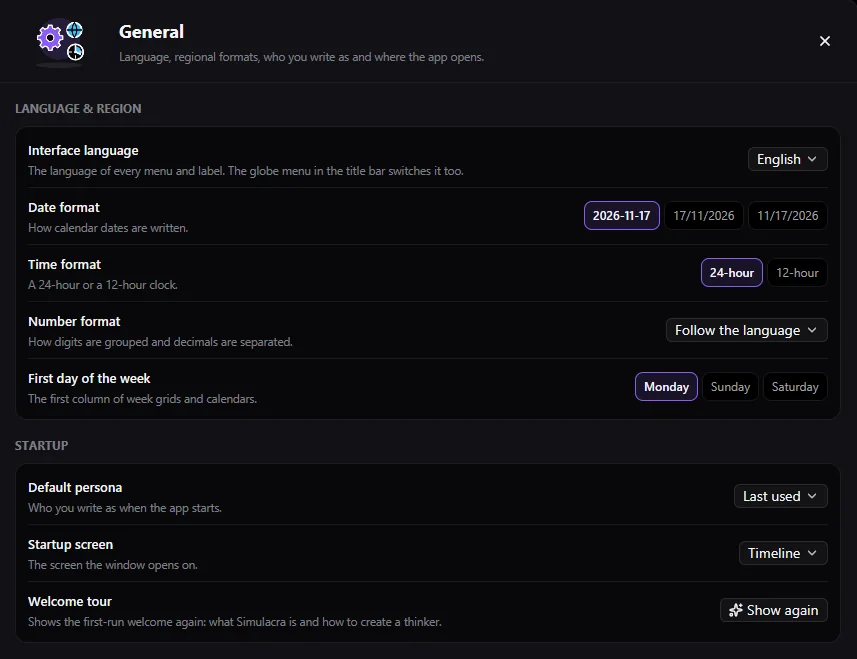
LANGUAGE & REGION
| Setting | Control | Options | Default | What it does |
|---|---|---|---|---|
| Interface language | Menu | English, Bahasa Indonesia, Español, 简体中文, 日本語, Français, Deutsch, Português, Русский, العربية | English | The language of every menu and label. It switches at once. The globe menu in the title bar changes the same setting. |
| Date format | Chips | 2026-11-17, 17/11/2026, 11/17/2026 | 2026-11-17 | How every date is written: on posts, quotes, review cards, profiles, views (board, garden, calendar), the history sheets, mood check-ins, Insights and the Still true? prompt. Month-first also puts the month first in short dates (Aug 12). |
| Time format | Chips | 24-hour, 12-hour | 24-hour | How times are written in the same places (14:41 or 2:41 PM). |
| Number format | Menu | Follow the language, 1,234.5, 1.234,5, 1 234,5 | Follow the language | How digits are grouped. In 0.2.0 it formats the numbers of the Settings window itself (for example the daily token cap). |
| First day of the week | Chips | Monday, Sunday, Saturday | Monday | The first column of the calendar view. |
Follow the language groups thousands with a period in German, Bahasa Indonesia, Spanish and Portuguese, with a thin space in French and Russian, and with a comma in the other languages.
The languages and what is translated are listed in Languages.
STARTUP
| Setting | Control | Options | Default | What it does |
|---|---|---|---|---|
| Default persona | Menu | Last used, then each of your personas | Last used | Who you write as when the app starts. |
| Startup screen | Menu | Timeline, Knowledge Vault, Mind Graph, Agent Lab | Timeline | The screen the window opens on. |
| Welcome tour | Show again | Closes Settings and shows the first-run welcome again: what Simulacra is and how to create a thinker. |
Both startup settings take effect the next time you start Simulacra. The persona menu lists only your own personas, not agents. If the persona you picked is deleted later, the app falls back to the persona used last.
Change the interface language
Open General
Press Ctrl,/⌘,.
Pick a language
Click the Interface language menu and choose a language. Every label, including this window, redraws in it straight away.
Tips and limits
- Times are local. Every time is shown in your computer's time zone. A post shows only its time today, Yesterday 14:41 the day before, the day and month earlier in the year (12 Aug) and the full date before that.
- File names, exports and the dates you type into fields keep the
2026-11-17form whatever you choose, so they sort and read back the same. - Show again is also in the command palette as Show the welcome tour. See First launch.
Related
The Settings window
How the Settings window is laid out, how every kind of setting row works, how changes are saved, and how to search, reset and navigate it.
Reading & Writing
Post length, automatic archiving, symbol shorthand, feeling check-ins, the writing hints under the composer, what links and hashtags do, and the daily feed budget.