 Simulacra
Shortcuts and Advanced
Open the keyboard shortcut sheet, the diagnostic options, and reset every setting to its default.
The last categories of the rail are short: Shortcuts opens the shortcut sheet, and Advanced holds diagnostics and the reset of every setting.
Shortcuts › KEYMAP
| Row | Button | What it does |
|---|---|---|
| Keyboard shortcuts | Open shortcut sheet | Closes Settings and opens the shortcut sheet, which lists every shortcut. Ctrl//⌘/ opens it from anywhere. |
Shortcuts cannot be changed in 0.2.0. All of them are listed in Keyboard shortcuts.
Advanced
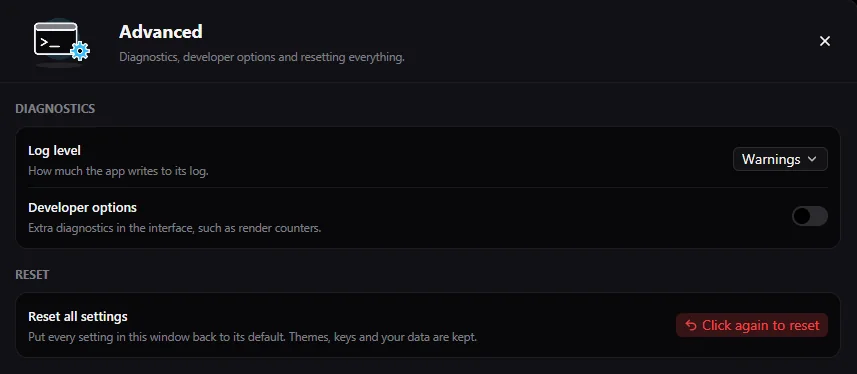
DIAGNOSTICS
| Setting | Control | Options | Default | What it does |
|---|---|---|---|---|
| Log level | Menu | Errors, Warnings, Info, Debug | Warnings | How much the app writes to its log. Saved, not yet used by 0.2.0. |
| Developer options | Switch | Off | Extra diagnostics in the interface, such as render counters. Saved, not yet used by 0.2.0. |
RESET
| Row | Button | What it does |
|---|---|---|
| Reset all settings | Reset all | Puts every setting in this window back to its default. Themes, keys and your data are kept. |
Reset all settings
Click Reset all
In Settings › Advanced, click Reset all. The button turns red and reads Click again to reset.
Click again
Click it a second time. A toast says Every setting is back to its default.
Changing any setting, switching category or closing Settings in between cancels the waiting reset.
What it resets and what it keeps:
| Reset | Kept |
|---|---|
| Every row of General, Appearance (reading width, reduced motion), Reading & Writing, AI & Models (timeouts, retries, budget), Embeddings, Images, Agents & Simulation, Learning, Import, Privacy & Data, Notifications, Code and Advanced. Autonomous posting goes back to off. | The theme, its colours, font, text size, density and corners; the AI provider, key and model; credentials; downloaded icon sets; panel sizes; and everything in your vault. |
To put one setting back, use the arrow beside it instead (Reset to default). To reset the panel sizes, use Reset layout in Typography and layout.
Related
Code
Let the code blocks of posts run with the runtimes installed on this computer, set the time limit, and choose which runtimes may be used.
Your data
Where everything you make in Simulacra is kept, and the three ways to copy it out: a plain backup, a portable export bundle and an encrypted snapshot.