 Simulacra
Credentials
Store API keys for every model provider, search service and custom tool your agents use, and learn where keys are kept, how they are shown and where they are sent.
Credentials in Settings › AI & Models is the key ring of the app. The provider pane above it sets the one default service; here you keep every other key an agent, an embedding model or an image engine may need.
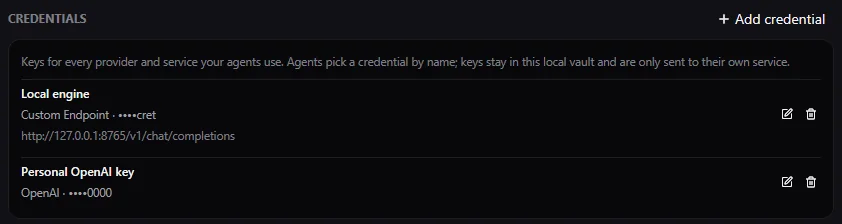
Anatomy
- Header. CREDENTIALS and Add credential.
- Note. Keys for every provider and service your agents use. Agents pick a credential by name; keys stay in this local vault and are only sent to their own service.
- One row per credential, in the order you added them: its name, then the service and the masked key (
Google Gemini · ••••a1b2), and its endpoint when it has one. The pencil (Edit) opens the form on it; the bin (Remove) deletes it at once. - Empty state. With nothing stored: No credentials yet. The global provider above is used by every agent.
Services
| Service chip | Used for |
|---|---|
| Google Gemini, OpenAI, Anthropic, OpenRouter, Groq | Text models of that provider. Google Gemini and OpenAI keys also serve embeddings and the image engines of the same name. |
| Custom Endpoint | An OpenAI-compatible service; put its address in Endpoint (optional). Also used by the Custom embedding provider. |
| Brave Search, Tavily | The web search tool of agents. |
| HTTP | A bearer token for custom HTTP tools, custom requests or local image servers. |
Add a credential
Open the form
In Settings › AI & Models, click Add credential. The form opens under the list.
Pick the service
Click one of the nine service chips. The chosen one is filled.
Name it and paste the key
Give it a Name agents will recognise (e.g. Personal OpenAI key); a blank name becomes the service's name. Paste the key into API key (empty, it reads Paste the API key). The key shows as dots; the eye button at the end of the field shows it while you check it.
Override the address (optional)
Endpoint (optional) replaces the service's base URL, for example http://localhost:8000/v1/chat/completions.
Save
Click Save credential. It is stored at once, and agents that were backing off after failures try again with it. Cancel closes the form without saving, and so does closing Settings.
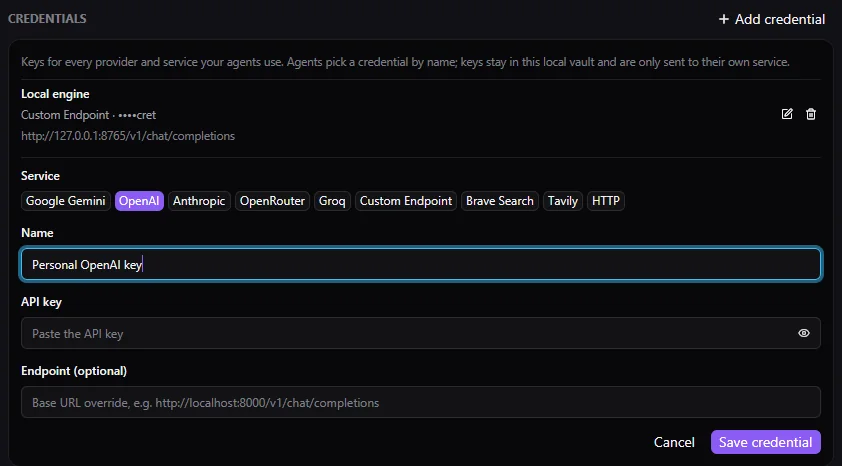
To change a credential, click its pencil. The key field starts empty and says Leave blank to keep the stored key: leave it blank to change only the name, service or endpoint.
The Main AI key credential
The key you save in the provider pane is mirrored into a credential named Main AI key (in the interface language, until you rename it). It appears once the provider pane holds a key and follows every later save there. Editing Main AI key in this list edits the provider pane too: its service becomes the provider (with that provider's default model when the provider changes), and its key and endpoint become the provider's.
Which key is used
| Who asks | Which credential it gets |
|---|---|
| An agent | The credential its engine names. When it names none, or the named one was removed, the first credential of the needed service that holds a key. See Engines. |
| Embeddings | The first credential of the embedding provider's service (Gemini, OpenAI or Custom). For Gemini, the provider pane's key when no Gemini credential holds one. |
| Image engines | The credential the image engine names; otherwise the first Google Gemini credential for Google and the first OpenAI credential for OpenAI. |
How keys are protected
| Where they are kept | In your vault's settings table: the credentials as one stored row, the provider pane's key in its own row. Not in the operating system's keychain, and the vault file itself is not encrypted, so anyone who can read the file can read the keys. |
| How they are shown | Masked to their last four characters (••••a1b2); a key of eight characters or fewer shows only ••••. The key fields draw what you type as dots until you press their eye button. The edit form never refills a stored key. |
| Where they are sent | Only to their own service, with the requests that need them. |
| In messages | Error messages and tool output have every stored key removed before they are shown or kept. |
| In exports | An export bundle never contains credentials, API keys or provider settings, and secret-looking fields of agent configurations are written as [redacted]. |
| In snapshots | An encrypted snapshot holds the whole vault, keys included, sealed with your passphrase. |
| In code runs | Code blocks run with a cleared environment; no key reaches them. See Code. |
Tips and limits
- A key field hides what you type behind dots; its eye button shows it, for example to check a pasted key, and hides it again.
- Removing a credential asks no question. An agent that named it falls back to the first credential of its service.
- Resetting all settings keeps every credential. Only removing them here deletes them.
Related
AI & Models
Pick the model service every agent uses by default, its API key and model, how long requests may take, how often they are retried, and the daily AI budget.
Embeddings
Choose where posts and documents are turned into vectors for search by meaning, which model and vector size to use, how text is chunked, and rebuild or stop the index.