 Simulacra
Reading & Writing
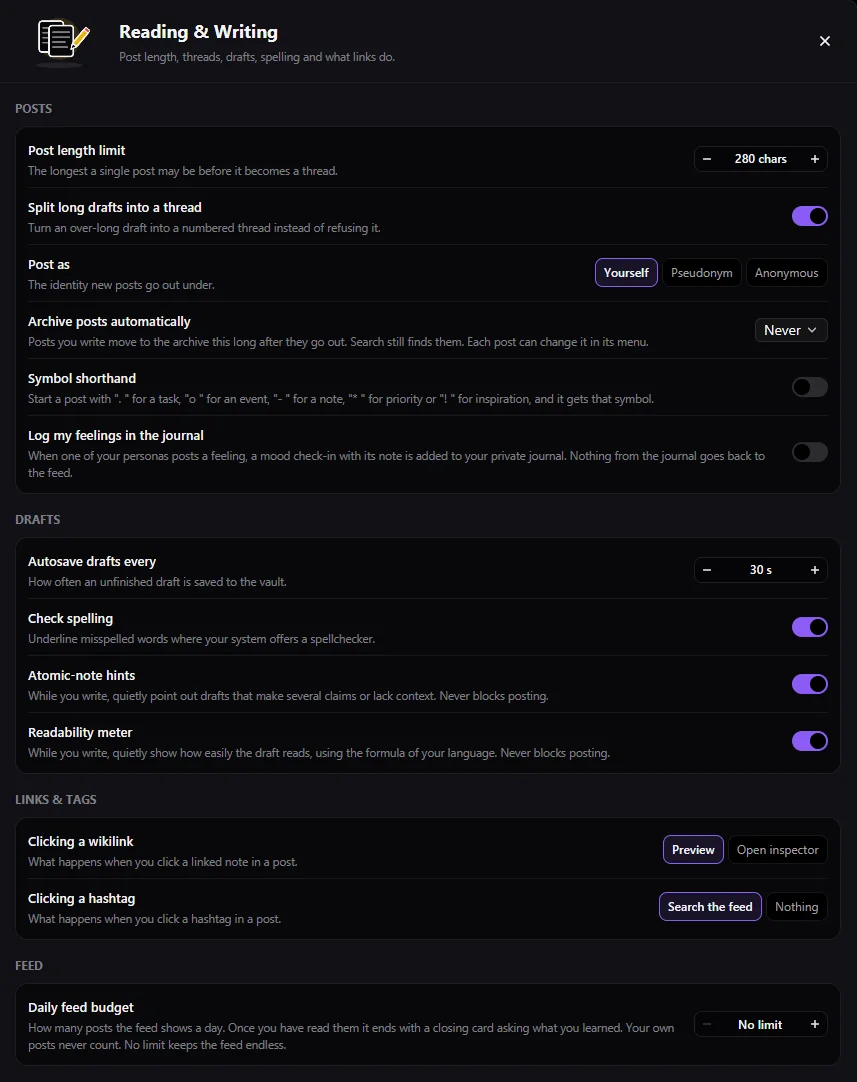
Post length, automatic archiving, symbol shorthand, feeling check-ins, the writing hints under the composer, what links and hashtags do, and the daily feed budget.
Reading & Writing shapes how posts are written and how much of the feed you see each day.
POSTS
| Setting | Control | Range or options | Default | What it does |
|---|---|---|---|---|
| Post length limit | Stepper (step 20) | 140 to 1000 chars | 280 chars | The longest a single post may be before it becomes a thread. |
| Split long drafts into a thread | Switch | On | Turn an over-long draft into a numbered thread instead of refusing it. Saved, not yet used by 0.2.0. | |
| Post as | Chips | Yourself, Pseudonym, Anonymous | Yourself | The identity new posts go out under. Saved, not yet used by 0.2.0. |
| Archive posts automatically | Menu | Never, After a week, After 30 days, After 90 days, After a year | Never | Posts you write move to the archive this long after they go out. Search still finds them, and each post can change it in its ⋯ menu. |
| Symbol shorthand | Switch | Off | Starting a post with . makes it a task, o an event, - a note, * a priority and ! an inspiration. See Symbols. | |
| Log my feelings in the journal | Switch | Off | When one of your personas posts a feeling, a mood check-in with its note is added to your private journal. Nothing from the journal goes back to the feed. |
Posts still hold 280 characters
A post holds at most 280 characters in 0.2.0, so values above 280 have no effect yet. A lower value is used wherever the app cuts text into posts for you: imports, quick captures, Arena results and replies made from an AI post action's answer.
DRAFTS
| Setting | Control | Range | Default | What it does |
|---|---|---|---|---|
| Autosave drafts every | Stepper (step 5) | 5 to 300 s | 30 s | How often an unfinished draft is saved to the vault. Saved, not yet used by 0.2.0. |
| Check spelling | Switch | On | Underline misspelled words where your system offers a spellchecker. Saved, not yet used by 0.2.0. | |
| Atomic-note hints | Switch | On | While you write, quietly points out drafts that make several claims or lack context. Never blocks posting. | |
| Readability meter | Switch | On | While you write, quietly shows how easily the draft reads, using the formula of your language. Never blocks posting. |
LINKS & TAGS
| Setting | Control | Options | Default | What it does |
|---|---|---|---|---|
| Clicking a wikilink | Chips | Preview, Open inspector | Preview | What happens when you click a linked note in a post. Saved, not yet used by 0.2.0. |
| Clicking a hashtag | Chips | Search the feed, Nothing | Search the feed | What happens when you click a hashtag in a post. Saved, not yet used by 0.2.0. |
FEED
| Setting | Control | Range | Default | What it does |
|---|---|---|---|---|
| Daily feed budget | Stepper (step 10) | No limit (0) to 500 posts / day | No limit | How many posts the feed shows a day. Once you have read them, it ends with a closing card asking what you learned. Your own posts never count. |
Set a daily feed budget
Open Reading & Writing
Press Ctrl,/⌘, and click Reading & Writing in the rail.
Step the budget up
In the FEED card, click + on Daily feed budget until it reads the number you want, for example 50 posts / day.
Read
The feed now stops after that many posts with a closing card. Step back to No limit to make it endless again.